










Have you ever hear about 迅雷 (XunLei) Thunder 5? It is new to me last month. 迅雷 (XunLei) Thunder 5 is a download manager. Besides download normal http or ftp files, it can be used to download BitTorrent and Emule pear to pear (p2p) files type too. I tested 迅雷 (XunLei) Thunder 5 for several weeks after recommended by my friend. In short, the download speed is never the same as before. It is really fast. But it is an ad-ware. 😛
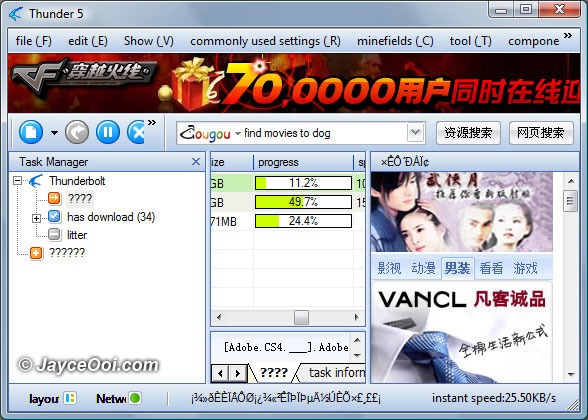
Why I say 迅雷 (XunLei) Thunder 5 download speed is fast? 迅雷 (XunLei) Thunder 5 will find addition sources for the files that you download. Therefore, you are using just 1 source to get your files but a lot of sources. In the end, the download speed improves. However, 迅雷 (XunLei) Thunder 5 is only available in Chinese language. I need to change my windows native local language to Chinese PRC in order to install it. However, I did not want to use Chinese PRC as my native language for my windows. Therefore, an English language pack for 迅雷 (XunLei) Thunder 5 is needed. Here is the 迅雷 (XunLei) Thunder 5 English language pack that I have. Use the link below to download.
Download 迅雷 (XunLei) Thunder 5 English Language Pack version 0.1 here
Updated – Latest version Thunder 5.9.12.1196 cannot use this English Language Pack. Download older working version 5.8.7.625 here.










Hi Jayce,
I have tried to use that software before but after a period of time the downloading become much slower compare to Utorrent.
Hmm… XunLei still serve me well for the moment. Will try Utorrent when XunLei starting to slow down. Thanks for the info by the way. 😉
Hello, Jayce, can I download an English version Xunlei? Thanks.
No official English version, only language pack.
how come cannot download the xunlei software
Huh? You should be able to download it at http://www.xunlei.com/ 🙂
Woow, thank for introduce such great tool to speed up all our download.
No problem, bro.
Besides Thunder, Halite and Deluge is also fast. There is a no-ad version of Thunder, released by Ayu I think.
You can also try BitComet 0.66 Mod version. It gives you fast download…
@whiztech, @Wing Loon: Thanks for the info.
Thank you so much for the Language Pack, it works well…. Two thumbs up
You are welcome. 🙂
Obviously, you didn’t acknowledge where you get that translation pack from…
I got it using this P2P software.
Actually, you can create your own language pack too. Just copy the existing Chinese files. Then change to the language that you want. That’s all. 🙂
it is a zip folder rite????huw should i open the file..can u giv me d instruction 1 by 1 huw 2 download..thanks……
Yes, i know. Just that the work from the previous person should be acknowledged. Not many is willing to spend time to do the translation.
Anyway, thanks for spreading the “beauty” of XunLei.
No problem. 😉
hey i use utorrent and the thing i like about it is you can resume downloads will thunder 5 have this
I’d really appreciate you link the original English Translation source. It’s a shame for copying others work and uploading it on your own blog.
Do delete this post after that.
If this is your own work, I’d acknowledge it.
@HeHeHunter: Sorry that I don’t know you are the creator of this language pack. I got this from emule network. Some one must have shared it.
No worry. I put the download link to your page already. By the way, thanks for the language pack. It is so nice of you to do so. 🙂
Hi, Jayce:
thanks for sharing the great file. my question what to do after I download your language file? my Thunder still shows massy code that can not be recognized.
Thanks
@roman: Please get the guide at Thunder English, XunLei English 5 language pack installation guide
I don’t think that you learnt your lesson.
Please credit other people’s work. Don’t just modify it and make it as your own guide. Unless it’s fully your hardwork, do credit the person who created it.
hi helloy you take me manny
@HeHeHunter: Come on. I recreated a new Thunder 5 English Language Pack version 0.1. I can’t come out a simple few sentences guide?
HaHa! I just saw you ‘new’ version of Xunlei Translation. Didn’t you previously used mine?
Anyway, I do not wish to bother you. Happy Blogging.
@HeHeHunter: You too. Happy Blogging. 🙂
heyz … just wanna ask ur opinion … well i tried to download xunlei and my anti-virus said its a harmful program … so im not sure whether to continue to download it or not … cause i had bad experiences in the past bout virus … i had two computers down cuz of virus and i dun wan my laptop to be the third … anyways hav u encounter any virus while downloading files??
@Jake: XunLei itself does not have virus. However, do be careful with files that you download with XunLei. They might come along with virus. Select the right source to download your file. I did face some virus along the way. Luckily, my antivirus is able to detect and delete them. 😉
what the heck ? the software cannot be download i click the xunlei just keep redirect to the page itself..
@Lah Kian: Please download XunLei software at XunLei website. I don’t have it here. How do you click on it? I wonder…
hi…dunno y my thunder keep having this webpage cannot be display whet happen to my thunder? can some wan help me? thanks
I had followed ur step.. download and unzip the file.. and copy it into the languages folder… but its still the same… under view language.. i only can select 2 languages which is Chinese simplified n traditional ONLY. theres no option for me to select to english. is this only works for certain window only?
n btw.. what shuld i set it to? cos everytime i start to load this thunder5, its will pop out a msg : “cannot find “about:blank, make sure the path and internet address is correct”
@lovepark: Which version are you using?
I am using 5.1.3.xxx cant remember… and i had uninstalled it.
or.. is it bcos i am using Vista?
last night i had just uninstall the thunder and re-install a different version again… now i can choose the english language.. but still theres some word is not translate.. still in “????” ??
after reinstall new version.. whole night i use this thunder was okay.. but the next day the speed become very slow.. so i restart my laptop again.. and the speed is back to faster.. but after few min.. its come out with the blue screen >>>> http://img5.imageshack.us/img5/9764/picture27pyr.jpg
after i restart again the same things happen again n again… this is not the 1st time happened..before this i used webthunder also the same problem..
@lovepark: Not all the Chinese words are translated into English. So there will be “???” for those are not translated.
Did not face BSOD on my system when using Xunlei. I looked at your screen shot. It might be something wrong with your network driver or your network hardware. Xunlei tends to use lot of network resources.
can window vista install thunder 5?
@faz: I am using it with Windows Vista now. 🙂
I think people are misunderstanding Xunlei.
It does not increase your speed by finding more sources – that is impossible. Any decent bt client like Microtorrent will find all available up to the limit of connections that your OS (usually 10 or 20 connections for X, though there is a hack to remove that limit).
What it does do is to attempt to bypass “throttling” of BT by your ISP. Throttling is when your ISP detects P2P protocol on standard BT ports they automatically reduce your downlaod speed to something rediculously slow. Comcast in the US were the first to do this, and that case is in court, but many “cheap” ISPs now do the same. To bypass this throttling, Xunlei uses port 80 which is the port your browser uses. In some cases that works. In other cases, the ISP even checks port 80 and does the same throttling. That is bad because then your rapidshare downlaods will be hit as well.
There is also a problem of Xunleis default settings which I am told do not let it share – ie it is a leech machine. Two things against that – first problem is that some trackers and some clients now ban Xunlei as a leech (downlaod but no upload). The trackers are usually the private ones having the best torrents. Public torrents like Minova or Piratebay should be OK, but more and more traffic is now via the private trackers.
Second problem is thatUnless you set Xunlei to share the files then many clients will ban you and not connect to you. OR your “ratio” on the private tracker will fall lower and lower and the speeds will get slower and slower and finally stop.
So it may help – try it -or it may be worse than a standard client.
Commonsense really – when somebody tells you that you can buy some apples at 1/20 the price of the market – do you go and buy? If somebody sells you a car at 1/4 of the price listed are you not suspicious? There’s no such thing as a free luch. And Xunlei proves it.
The no ads mod is esential. In itself Xunlei does not casue problems, but some of the ads it runs from third parties are said to drop spyware. Tnask for that tip.
PS You can test throttling by trying Microtorrent with no obfuscation. Pick any popular torrent from Minova -one with hundreds of seeds and leechers. Try to run it with defualt ports (ie as installed first time). Note the download speed after 15 minutes. It may be fast (say 400 Kbytes per second on a standard 3 Mbit ADSL Broadband, or it may be slow – less than 40 Kbytes per second) Now turn on obfuscation and change the UDP and TCP ports to womething weird like 45591 and 45592 restart Microtorrent (open those ports in your firewall if you need to and test them to make sure it works). Now note the speed after 15 minutes. If you are still showing slow download (less than 50KB/s then your ISP is using smart thottling. In that case, change ISP or try Xunlei. But if it is now very fast using the new settings on Microtorrent then your ISP is using crude throttling and you have bypassed it – until they decide to upgrade their throttling. The safest thing to do is to ask around friends and see the speeds they get with other ISPs. If they have a good speed (go see it and try your fast torrent file) then change ISP – that is the long term solution.
Have fun! Me? On a small file with only one seed it might take me a week to get it. On a 4 Gbyte file with a few hundred seeds and leeachers I get 450 KB/s easy. Thas about the max from my connection. 450/s = 25 Mbytes per minute = 1.5 GB per hour = three hours or less for the 4GB.
Second problem is that
Thanks for the english version of Xunlei of thunder 5 The problem I have is under the file section I cannot open a new torrent file. What I did was to point the torrent file and shift it into the floating icon but than under the task info there is not info at all Is there a problem to it. Anyway thank you very much for this cos I am english edu.
How i gonna download?
Hiiiiiiiiiiiiiiiiiii………………..
how to download the thunder5 with no charges ?
Hi Jayce i’ve just installed xunlei/thunder version 5.8.14.706 was thinking i can test this new program for d/l’ing-streaming, etc.
I’m using firefox as my main browser and after installing thunder i went back to their main site and tried to stream some of the video’s that they have links to but i keep getting a error msg saying i don’t have xunlei kankan mod/addon installed and when i click on their link provided it just d/l’s xunlei / thunder again.
Is there anything you can help me with? i.e maybe i missed something during the installation?
can u teach me how 2 download it .i dunno how 2 do can u write the full step 4 me pls .cause i want thunder eng laug pack pls.
wat king of BitComet 0.66 Mod version still need pay up….zz…and thx for the eng laugh pack jayce
erm….sry i men kind….by wing loon….zzz -.-“
very very gud o….
Thank for help download xunlei
can’t download xunlei ? pls help. How long it takes to download ?
i already have chinese version of Xun Lei 5, but today it asked to download the latest Thunder5.9.6. just wonder izit the latest? thanks if you could help me
Hi,
I love Thunder and been using it for some time now.
All my downloads stops at 99,9%. Does anyone know what causes this.
Thanks
Xun Lei is available for window vista?
@Fong: Yes. I am using it on Windows Vista now.
anybody can help me resolve this problem? i cannot DL anything.this thing keeps on popping up
此操作被浏览器拒绝!
请在浏览器地址栏输入“about:config”并回车
然后将[signed.applets.codebase_principal_support]设置为’true’. pls send it to my email: coop_780@hotmail.com
my download used to be more than 50kbs, but now, the max will not be more than 20kbs. what happened? even the seeds and peers are a lot. pls help.
could it be bcos of fair bandwidth usage introduced by tmnet or they know how to curb it now.
can u be more nice?? coz susah nak download lo.. click many url cnt find thunder 5 english version.. tq^^
Is downloading Xun Lei for free??
this Xun Lei is don’t believe it! But I haven try this for free download. That is not to run?
Thanks for the english version of Xunlei of thunder 5 The problem I have is under the file section I cannot open a new torrent file. What I did was to point the torrent file and shift it into the floating icon but than under the task info there is not info at all Is there a problem to it. Anyway thank you very much for this cos I am english edu.
this Xun Lei si free download? I don’t believe!!
i want to a new Xun Lei! I want to get this Xun Lei
Hi, Jayce,
Thanks for the info ya…all this while i was looking for a english downloader of xun lei, but i cant get hardly. Im not a mandarin educated. Only can read english. So i need that english version so much . This is a great great job that i got it here from u. Really thank you so much. I love it…!!! Really really really thanks to u jayce…!!! Thanks You….!!! By the way i still need to download and see first, goin to download and see how’s it work well…will respond back to u soon…!!! Thanks ya….!!!
Angelyn..
Jayce,
Pls help!!!….i download already…but how come it still chinese version…?…!!!help me pls……..
help…………..
Install this version http://forum.jayceooi.com/viewtopic.php?f=6&t=265
Latest version from Xunlei website cannot support English pack.
I have an excellent “portable” version of Xunlei by Victory Raizy that has a comprehensive English translation. This version can run without installation. The only issue is that torrent files have to be dragged into the Xunlei window as the torrent files are not registered to the “portable” version. It is ad-free too.
Here is the TPB link: http://thepiratebay.org/torrent/4636021/Thunder_5_English_Portable_Best_Download_Program_%5BVictory%5D
Merry christmas & a happy new year!!!! Xunlei rulez 😉
Jayce,
I have an excellent “portable” version of Xunlei by Victory Raizy that has a comprehensive English translation. This version can run without installation. The only issue is that torrent files have to be dragged into the Xunlei window as the torrent files are not registered to the “portable” version. It is ad-free too.
Here is the TPB link: http://thepiratebay.org/torrent/4636021/Thunder_5_English_Portable_Best_Download_Program_%5BVictory%5D
Merry christmas & a happy new year!!!! Xunlei rulez 😉
Anyone who is fluent in Mandarin, can you please research the compatibility of Xunlei (Thunder 5) with the relatively new “Magnet” link protocol that trackers such as TPB are promoting? I can’t seem to get Xunlei to recognize Magnet links as a valid P2P file type.
uTorrent & the rest support Magnet but are still slower than my beloved Xunlei. Xunlei just can’t be throttled by any M’sian ISP. I get beyond 100kbps using Xunlei on a well seeded torrent!!!!
Thanks.
P.S. To ensure that you are giving back to the community (& that Xunlei doesn’t get blocked by private trackers) just manually seed your completed downloads. By default Xunlei only seeds completed files for no more than 5 minutes! This is why Xunlei is accused of being a “leech” application.
To manually seed in Xunlei (if you aren’t a Mandarin speaker) you’ll need Victory Raizy’s english translation (see my previous post).
Cheers.
I ..哦 试试
heyy……xunlei.com cant download the software…and i was wondering if can gimmi a specific link to download this software
Is downloading Xun Lei for free??
how download o???
I re-installed Thunder 5.8.7.625 with the English pack on my desktop opertaing on OS Window 7. The resultant screen is a mixed of English and Chinese characters. The toolbar on the first row is in English. The toolbar on the second row and the left hand column were displayed in Chinese characters. Opening up the menu on the second row toolbar again result in a mixed of Chinese and English. The menu on the left column was in Chinese but the settings on the right were displayed in English. Although this mixed display was recognizable by me, is there a way to rectify these abnormalities. I tried to switched the admininstrative language to English, it resulted in those parts that were displayed in Chinese as “???”. Changing it to either PRC Simplified Chinese or Singapore Simplified Chinese reverted the displayed with the mixed languages.
Are there anyone who had faced the same problem and found a solution? Your response is appreciated. Thanks.
Stephen
Hello,
seems the author of this language pack discontinued his work. It would not be too difficult to polish and finish this, but I guess there are some hardcoded phrases inside thunder, which one can not translate.
I would like to continue this work. If anyone here knows an email-address of the author, please tell me.
On the other hand, thunder 5.8.x is outdated, as thunder 5.9.x is released, which is not customisable like 5.8.
Now the question is, why the authors of thunder use this way. Maybe, they do not want their software beeing used worldwide, or they want to provide their own translations (and decide this way where it can be used).
I am interested in using thunder too and would appreciate a clean and completely localized version, not only english, I could offer german, too.
But it is hard for me to decode xunlei’s homepage, thus my question: does anyone here know how to get in contact with the coders of thunder 5.9? Please let me know. Maybe there is a way to include some more languages.
Uli.
Hi folks,
I tried to use the English Language Pack version 0.1 from above. Unfortunately it mangles up some menus, for example, in tools->configuration->BT/port settings->share settings there should pop up a box in which I can select minutes and hours.
I can not.
Looking into Thunder.ini, the reason is obvious. The corresponding line looks like this:
String33270=30 minutes \ n1 hour \ n2 hour \ n5 hours \ n manually stop
which is wrong. Change this line to
String33270=30 minutes\n1 hour\n2 hour\n5 hours\nmanually stop
restart thunder and you will see it works now as expected.
This ‘\n’ is taken from the C programming language and means just to start a new line. The author of this translation changed every ‘\n’ to ‘\ n’, which just prints ‘\ n’ but does not start a new line.
Also, all ‘%s’ and ‘%d’ (a string and a decimal number) are changed to ‘% s’ and ‘% d’, which prints just as ‘% s’ and ‘% d’, but does not insert a string or decimal as the program wants to do.
Before this laguage pack becomes useful, there will have to be done some work on it.
Uli
I don’t see any xun lei app so how do i open it??
Look carefully. The app link is there…
i able to load the thunder versionwhich use before buttttt not working properly like before…the english pack too many alliens words woooo….what can i do to solve this out
Got some alien words are normal. 😛
instead should say clearly , when load programme is ok butmload movie is not working the title will be error….
why i can”t download the movie if the file name is shown – 3E ???
Hi Anson,
i faced the same problem. I cannot download any movie & the file name is shown – 3E for ALL movie i clicked. And it never download….. Anyone can HELP ??!!
GooD news!! … Finally, i able to download moviee. I think my laptop got Virus, so i cant download any movie. That’s why i decided FORMAT my laptop & it’s work fine now…
I myself is a half-chinese half-filipino. Im living in the Philippines but my parents are chinese. The good thing is.. I understand Chinese, filipino and english so its ok for me to use the chinese version. But im going to download this version as well because to say the truth, Im better in english than chinese. :)) That’s so weird for other people… anyway thanks 😀 btw, add me in Yahoo messanger cah_fatty1997@yahoo.com
hi..me yoges here…..can any one forward me the link to download xunlei chinese version?…..mymail is evilgeniuswild@gmail.com…tq
http://dl.xunlei.com/
Can someone guide me how to download the said thunder as wish to d/load movie from tvboxnow .
hi all,
I’m able to download the thunder but with weird language ..can someone guide me how to convert to english ? if yes can someone show me the way …
hi all,
Im able to download the thunder but with weird language , pls guide me how to convert to english ..
https://www.jayceooi.com/2008/12/24/thunder-english-xunlei-english-5-language-pack-installation-guide/
Can someone guide me how to download the said thunder as wish to d/load movie from tvboxnow .
I cannot download any movie & the file name is shown – 3E for ALL movie i clicked. And it never download
hi,
I have downloaded x-625 but i am not able to conver it in english language though i have installed english converter in languages and trying 3rd option also.
can any body help me
further i is showing it is not available for outsider of china due to copyright issue.
plz guide me ,
thanks
HI Jayce, why & how my xunlei download is very slow when i want to enter this side + can’t download the movie recently .. now im using chinese xunlei (7) , before that is working OK . just 2 week ago got problem .. i check the virus ..but my pc seem ok free of virus…
So , pls help me on this…
Thank you very much .
Might be your Internet provider issue ~ block P2P file transfer.
Have the same problem with Mic, now I can’t even download xunlei ( all version ) .. If ISP block P2P file transfer, any solution to this issue? Appreciate your help, thanks Jayce.
Using virtual private network (VPN) can help solve the issue. But you need to pay the service.
thanks for your reply, Jayce 🙂
cant download???
Just tested. Both links are still working.
hi Jayce,
is there a ad/pop up remover for Thunder ver 7 ?
Sorry, I don’t have.
Hi,
I was just wondering if you know of any other sites that runs like very-cd/emule?
thank you
Hi chongy,
if you use QVOD player, you will find tons of movies at tom365.com, 3444.cc and similar pages.
oh thanks for the info! 🙂 but i was hoping to find a site that can download chinese series onto my laptop like verycd/emule once had! Any info on that by any chance? 🙂
hi chongy,
QVOD is streaming your desired movie to your local harddisk. I am sure, on the mentioned addresses you find series, too. there is a search box, did you try it?
For further assistance I would prefer to talk on qq messenger.
But anyway, wish you good luck.
Hi,
Oh I see. I will see what I can find! 🙂 thanks very much for your help! 🙂
Hi Jayce,
Please can i get the English version of Xunlei and does it work efficiently like the Chinese version?
There is no English version. But have English language pack.
its language pack doesn’t work at all or i just don’t know how to.
kindly tell me please. i already downloaded the thunder 5 tool. then it is in chinese version. i want to convert it in english but i don’t know how. please tell me how. thanks a lot.
Jhay, https://www.jayceooi.com/2008/12/24/thunder-english-xunlei-english-5-language-pack-installation-guide/
hi jayce can you help me how to use thunder?
cant approve magnet links??