Setup Silent Hill Homecoming USB PS2 joypad controller key. Huh? Why do you need to setup Silent Hill Homecoming controller key? Shouldn’t you can change it at the setting page? Hmm… I am not sure why. But all the key that I set at Controls page turned back to default after exit Silent Hill Homecoming. And I failed to make USB PS2 joypad controller right analog control stick to work. Therefore, I come out my own solution for this Silent Hill Homecoming USB PS2 joypad controller key issue.
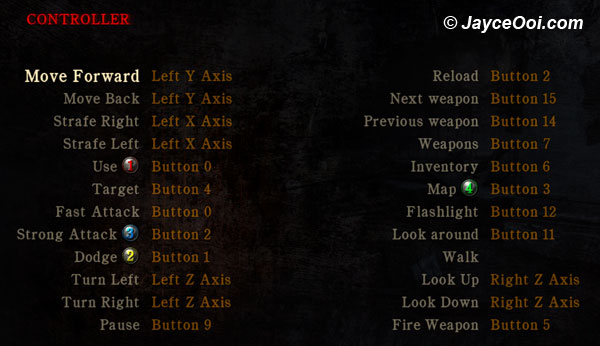
You can play Silent Hill Homecoming with keyboard and mouse. However, Silent Hill Homecoming is a TV console game and it is not suitable to play with keyboard and mouse. It is preferred to use joypad like XBOX 360 controller or any PC joypad to play. By default, Silent Hill Homecoming provides XBOX 360 controller key mapping. All the controller keys are mapped to XBOX 360 controller key value. It also provides PS2 controller adaptor key value. However, it does not work with my USB PC style PS2 joypad controller. Therefore, I need to change the mapping myself.
There is 1 file that I changed ~ binds_pc_mjs.cfg in C:\Program Files\Silent Hill Homecoming\Engine. Then, you need to select controller as your input in the Options -> Controls -> Use Controller. Download binds_pc_mjs.cfg and overwrite the original file.
You can change it for yourself too. Just open binds_pc_mjs.cfg in C:\Program Files\Silent Hill Homecoming\Engine with Notepad. Then change the mapping value to the key that you like.
Here are the mapping key values that I set.
### THESE ARE THE XBOX 360 VALUES, THEY ARE EQUIVALENT TO WHAT IS IN BINDS_XBOX360.CFG.
### USE THIS SET OF VALUES IF USEDIRECTINPUTAPI=0 IN YOUR DEFAULTS_PC.CFG (OR IF IT IS NOT SPECIFIED).
# =====================================================================
#
# BUTTON AND AXIS DESCRIPTIONS
# ———————————————————————
# BUTTON_0 : A (3)
# BUTTON_1 : B (2)
# BUTTON_2 : X (4)
# BUTTON_3 : Y (1)
# BUTTON_4 : Black
# BUTTON_5 : White
# BUTTON_6 : Left BUTTON (7)
# BUTTON_7 : Right BUTTON (8)
# BUTTON_8 : Start (10)
# BUTTON_9 : Back (9)
# BUTTON_10 : Left Thumbstick press (11)
# BUTTON_11 : Right Thumbstick press (12)
# BUTTON_12 : Directional Pad Up
# BUTTON_13 : Directional Pad Down
# BUTTON_14 : Directional Pad Left
# BUTTON_15 : Directional Pad Right
# BUTTON_16 : LEFT TRIGGER (5)
# BUTTON_17 : RIGHT TRIGGER (6)
# =====================================================================### THESE BINDINGS ARE COPIED DIRECTLY FROM THE XBOX 360 BINDS
setbind 1 COMMAND_FORWARD CONTROLLER 0 AXIS_Y 0.0 1.0 1.0
setbind 1 COMMAND_BACKWARD CONTROLLER 0 AXIS_Y -1.0 0.0 1.0
setbind 1 COMMAND_LEFT CONTROLLER 0 AXIS_X -1.0 0.0 1.0
setbind 1 COMMAND_RIGHT CONTROLLER 0 AXIS_X 0.0 1.0 1.0
setbind 1 COMMAND_PUNCH CONTROLLER 0 BUTTON_2 -1.0 1.0 1.0
setbind 1 COMMAND_KICK CONTROLLER 0 BUTTON_0 -1.0 1.0 1.0
setbind 1 COMMAND_ROLL CONTROLLER 0 BUTTON_0 -1.0 1.0 1.0
setbind 1 COMMAND_JUMP CONTROLLER 0 BUTTON_1 -1.0 1.0 1.0
setbind 1 COMMAND_STALK CONTROLLER 0 BUTTON_4 -1.0 1.0 1.0
setbind 1 COMMAND_BLOCK CONTROLLER 0 BUTTON_6 -1.0 1.0 1.0
setbind 1 COMMAND_USE CONTROLLER 0 BUTTON_3 -1.0 1.0 1.0
setbind 1 COMMAND_EXT_1 CONTROLLER 0 BUTTON_5 -1.0 1.0 1.0
setbind 1 COMMAND_EXT_2 CONTROLLER 0 BUTTON_8 -1.0 1.0 1.0
setbind 1 COMMAND_EXT_3 CONTROLLER 0 BUTTON_12 -1.0 1.0 1.0
setbind 1 COMMAND_EXT_4 CONTROLLER 0 BUTTON_13 -1.0 1.0 1.0
setbind 1 COMMAND_EXT_5 CONTROLLER 0 BUTTON_14 -1.0 1.0 1.0
setbind 1 COMMAND_EXT_6 CONTROLLER 0 BUTTON_15 -1.0 1.0 1.0
setbind 1 COMMAND_RELOAD CONTROLLER 0 BUTTON_7 -1.0 1.0 1.0
setbind 1 COMMAND_CAMERA_X CONTROLLER 0 AXIS_Z -1.0 1.0 1.0
setbind 1 COMMAND_CAMERA_Y CONTROLLER 0 AXIS_RZ -1.0 1.0 1.0
setbind 1 COMMAND_GAME_START CONTROLLER 0 BUTTON_9 -1.0 1.0 1.0
addbind 1 COMMAND_GAME_START KEYBOARD 0 KEY_ESCAPE -1.0 1.0 1.0setbind 1 COMMAND_UI_STICK_LEFT CONTROLLER 0 AXIS_X -1.0 0.0 1.0
setbind 1 COMMAND_UI_STICK_RIGHT CONTROLLER 0 AXIS_X 0.0 1.0 1.0
setbind 1 COMMAND_UI_STICK_UP CONTROLLER 0 AXIS_Y 0.0 1.0 1.0
setbind 1 COMMAND_UI_STICK_DOWN CONTROLLER 0 AXIS_Y -1.0 0.0 1.0setbind 1 COMMAND_UI_LEFT CONTROLLER 0 BUTTON_14 -1.0 1.0 1.0
addbind 1 COMMAND_UI_LEFT KEYBOARD 0 KEY_LEFT -1.0 1.0 1.0setbind 1 COMMAND_UI_RIGHT CONTROLLER 0 BUTTON_15 0.0 1.0 1.0
addbind 1 COMMAND_UI_RIGHT KEYBOARD 0 KEY_RIGHT -1.0 1.0 1.0setbind 1 COMMAND_UI_UP CONTROLLER 0 BUTTON_12 0.0 1.0 1.0
addbind 1 COMMAND_UI_UP KEYBOARD 0 KEY_UP -1.0 1.0 1.0setbind 1 COMMAND_UI_DOWN CONTROLLER 0 BUTTON_13 -1.0 1.0 1.0
addbind 1 COMMAND_UI_DOWN KEYBOARD 0 KEY_DOWN -1.0 1.0 1.0setbind 1 COMMAND_UI_SELECT CONTROLLER 0 BUTTON_0 -1.0 1.0 1.0
addbind 1 COMMAND_UI_SELECT KEYBOARD 0 KEY_RETURN -1.0 1.0 1.0
setbind 1 COMMAND_UI_DELETE KEYBOARD 0 KEY_DELETE -1.0 1.0 1.0
setbind 1 COMMAND_SHOWHUD CONTROLLER 0 BUTTON_8 -1.0 1.0 1.0
setbind 1 COMMAND_UI_START CONTROLLER 0 BUTTON_9 -1.0 1.0 1.0
addbind 1 COMMAND_UI_START KEYBOARD 0 KEY_RETURN -1.0 1.0 1.0
addbind 1 COMMAND_UI_START KEYBOARD 0 KEY_NUMPADENTER -1.0 1.0 1.0
addbind 1 COMMAND_UI_START KEYBOARD 0 KEY_ESCAPE -1.0 1.0 1.0
setbind 1 COMMAND_UI_BACK CONTROLLER 0 BUTTON_1 -1.0 1.0 1.0
addbind 1 COMMAND_UI_BACK KEYBOARD 0 KEY_ESCAPE -1.0 1.0 1.0
setbind 1 COMMAND_UI_BLACK CONTROLLER 0 BUTTON_7 -1.0 1.0 1.0
setbind 1 COMMAND_UI_WHITE CONTROLLER 0 BUTTON_6 -1.0 1.0 1.0
setbind 1 COMMAND_UI_X CONTROLLER 0 BUTTON_2 -1.0 1.0 1.0
setbind 1 COMMAND_UI_Y CONTROLLER 0 BUTTON_3 -1.0 1.0 1.0
setbind 1 COMMAND_UI_TABPREV CONTROLLER 0 BUTTON_4 -1.0 1.0 1.0
setbind 1 COMMAND_UI_TABNEXT CONTROLLER 0 BUTTON_5 -1.0 1.0 1.0setbind 1 COMMAND_TURNLEFT CONTROLLER 0 AXIS_RZ -1.0 0.0 1.0
addbind 1 COMMAND_TURNLEFT KEYBOARD 0 KEY_LEFT -1.0 1.0 1.0
setbind 1 COMMAND_TURNRIGHT CONTROLLER 0 AXIS_RZ 0.0 1.0 1.0
addbind 1 COMMAND_TURNRIGHT KEYBOARD 0 KEY_RIGHT -1.0 1.0 1.0
setbind 1 COMMAND_CLIMB_UP CONTROLLER 0 BUTTON_2 -1.0 1.0 1.0
setbind 1 COMMAND_CLIMB_DOWN CONTROLLER 0 AXIS_Z -1.0 0.0 1.0
addbind 1 COMMAND_CLIMB_DOWN KEYBOARD 0 KEY_DOWN -1.0 1.0 1.0
setbind 1 COMMAND_TOGGLEHELD CONTROLLER 0 BUTTON_0 -1.0 1.0 1.0
setbind 1 COMMAND_SKIP_CUTSCENE CONTROLLER 0 BUTTON_9 -1.0 1.0 1.0
setbind 1 COMMAND_TOGGLERUN KEYBOARD 0 KEY_LMENU -1.0 1.0 1.0
setbind 1 COMMAND_LEFT_THUMBSTICK_BUTTON CONTROLLER 0 BUTTON_10 -1.0 1.0 1.0
setbind 1 COMMAND_RIGHT_THUMBSTICK_BUTTON CONTROLLER 0 BUTTON_11 -1.0 1.0 1.0
Enjoy playing Silent Hill Homecoming with your controller.