02 Apr
Posted by Jayce Ooi as Software
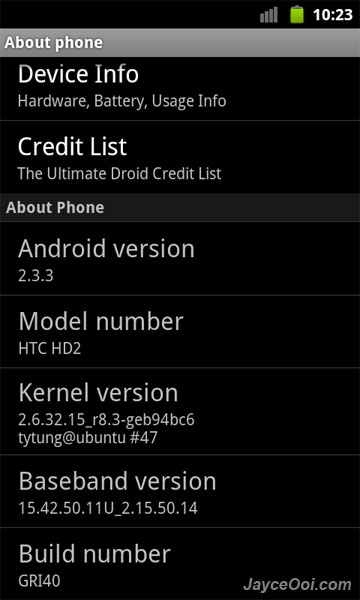
Yo… Yo… Ultimate Droid 3.2 is here. Based on ROM chef, crawlingcity, lot of changes had been done in this latest build. Check them out one by one by yourself on Ultimate Droid website. As usual, this build is based on Android 2.3.3 Gingerbread and using Tytung r8.3 Kernel.
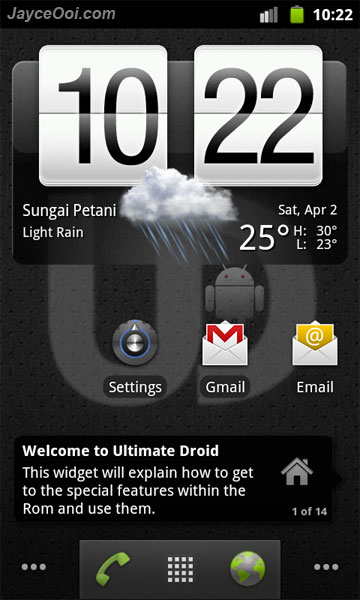
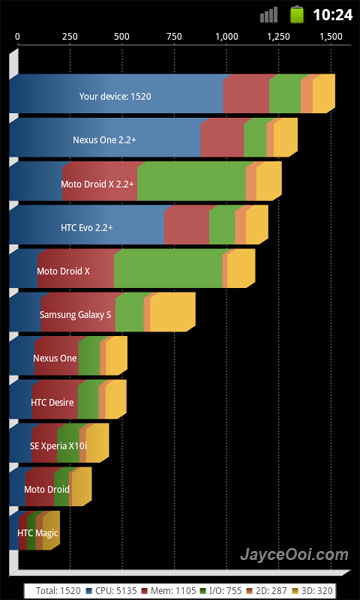
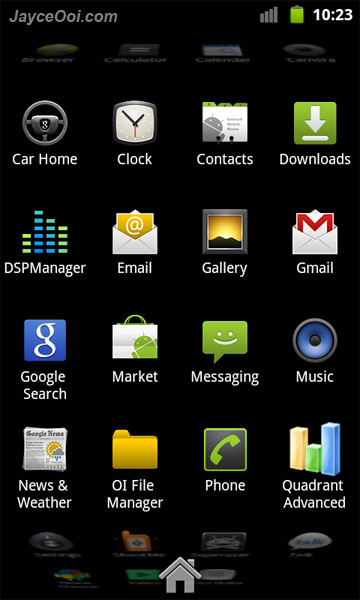
Ultimate Droid 3.2 on HTC HD2

Quadrant score

Stock 3D Launcher

Software information
Note – Android Market is missing. But no worry, it will show up after you sign in Gmail.
SD card partition guide ~ How to create ext3 partition on SD card with ClockworkMod Recovery?
Installation guide ~ How to Install NAND Android on HTC HD2 with ClockworkMod Recovery? (Video)
Download Ultimate Droid 3.2 [Kernel: Tytung R8.3] NAND A2SD+ Zip ROM here.

via: xda-developers
Tags: 2.3.3, A2SD, Android, crawlingcity, Gingerbread, HTC HD2, NAND, ROM, Tytung, Ultimate Droid, xda-developers, zip
[...] 2.3.3 Gingerbread that you should try. TyphooN CyanogenMod 7 RC4 BOYPPC-SHIFTPDA GINGER HoneyComB Ultimate Droid 3.2 MIUIVANILLA GINGERBREAD HyperDroid CM7 NexusHD2-Gingerbread HyperDroidGBXTags: 2.3.3, A2SD, [...]
This is an awesome Tom and cray fast. Thank you Ultimate Droid! I only have one minor issue… The homescreen orientation I personally prefer for the home screen to stan in portrait mode but I dont want to completely disable theb auto orientation. Any help would be greatly appreciated.
There is a way to disable it. But you have to look for it in the settings.
Thanks, I found it.
I want to install Android on my cell phone but do not know how I have a t-mobile htc hd2 with window 6.5
Just follow the installation guides here.
Hi Jayce,
Is the a SD version of Ultimate Droid 3.2? or any stable ones?
I have some software that will only run on windows and some only on android, so I’m planing to have multi boot. Thanks for your assistance in advance.
Most of the latest Android builds are based on NAND. But you still can try out SD Android at http://www.jayceooi.com/2010/12/29/top-10-android-roms-for-htc-hd2/
Hi jayce, one question..hv u installed this rom, what the balane of yr internal memory when finish installed?..my one only 150mb..
Sorry, I did not check when I tested it. I used 150MB partition layout. So should have around 250MB internal storage left I think.
Ooo Ok…will do that..
BTW…there a downloading problem with Market…
It started yesterday when i’m using Ultimate Droid 3.2 NAND Android A2SD+ Zip ROM for HTC HD2, at first, YES i can download some apps at first, but later that evening it just says “Starting Download” but never actually starts downloading.
This morning i download the TyphooN CyanogenMod 7 RC4 NAND Android A2SD+ Zip ROM for HTC HD2 , MIUIVANILLA GINGERBREAD NAND Android A2SD+ Zip ROM for HTC HD2,BOYPPC-SHIFTPDA GINGER HoneyComB NAND Android A2SD+ Zip ROM for HTC HD2 and Incredible Sense NAND Android A2SD+ Zip ROM for HTC HD2..
Installed and try all of them, but Market wont download..Weird..??..
I try to uninstalled updates for Market, restart still the same..no good..
if it still going like this i try to install the COre Droid again and see if there a problem occur..
revised….the above problem solve..
solution= i need to re flash back to WM then migrate back to Android…after that all okay..
dunno what causing this…
Now im using this rom (UD 3.2)for testing and evaluation..
all seem to be okay..but i don’t like that the phone internal memory leave me at 150mb…install this and that…leave me at 70mb but performance still good…some app can transfer to sd but some NOT. (the “NOT” that make the internal memory full.)
P/s : actually i still don’t understand what the function of doing the sd partition(ext).
last time i installed this rom without doing the partition(while in CWR) and still it work…and all the apps i can still transfer to my sd.
I’ve installed Link2SD. after i re installed rom and make sd partion in CWR.
it showed the storage
Internal – Total 150mb, used 74.2mb, free : 75mb
(this can be view in Application manager (andorid)
SD card – 6.44GB, used : 1.61gb, free 4.82gb
(this can be view in Application manager (andorid)
SD card 2nd part. – Total 0.89GB used 65.98mb, free 801mb
(i think this the ext partition that i do while in the CWR)
Cannot explore what inside this card..
i thought this is where the transferred apps will be transferred. I guess i was wrong.
sorry for my long explanation.I don’t know if this a info or problem.
I find it very odd that you are left with only 150 internal storage. I too installed the us 3.2 and it left me with 729 MB of internal storage.
aahh realy dude!!??..can u teach me how u do it..r u using Jayce guideline or by using yr own step..man oh man..hope u can help me with this…
UD is awesome jayce but i seem to have an issue when rebooting it, after a day or so i usually reboot it under recovery which works fine but when restarting it, the screen just stays at the first android logo symbol and doesn’t change. i usually have to do a hard reset for it to work, i don’t have a huge problem doing that seeing how i save everything but it is just a minor inconvenience
Why do you want to reboot into recovery? Just a normal reboot will do.
Hi Jayce,
I am using Ultimate Droid 3.2.5 and has the following problesm:
1. keep getting force close msg ” the application…. has stopped unexpected. Pls try again.” when running some apps like facebook even!
2. Also, the bottom left two buttons (one of them the home button) does not work.
3. the screen lock does not work when I off and on the power button.
Thanks Jacye,
rgds,
Bobby
Sorry, I did not try v3.2.5 yet. But going to try it now.
Hi Jayce,
I solved the problem! I found out that I did not run the CWM1.3 DAF.exe. I went straight to boot up in cwm1.3 then nand recovery and select zip from sdcard.
Thank you!
Have a great weekend:)
Bobby
Hi
Installation succes, followed all guides.
Have a strange problem, I cant search when I am in Android Market.
The 2 search options shows nothing when activated?
Solved – typical few minutes after posting.
New google acount and reboot did the trick (?)
Very fast and nice . . .thanks