










Lost your Samsung mobile device? No worry, Samsung DIVE comes to rescue. Samsung DIVE is a web application that track and control your device remotely for free. This service is available for latest Samsung mobile devices like Samsung Galaxy Tab 10.1, Samsung Galaxy Tab 8.9, Samsung Galaxy S2, Samsung Galaxy S and Samsung Wave. However, you need to activate this service on your Samsung mobile device first in order to use this track and control features. And data connection is required.
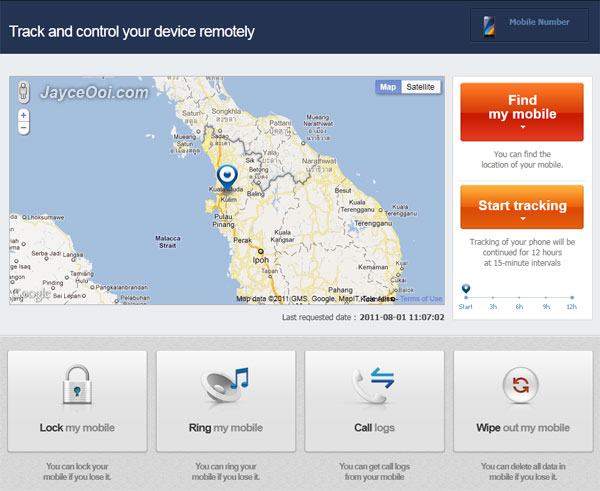
Samsung DIVE Features for Samsung Galaxy S II
- Find My Mobile
- My Missing Mobile Tracking
- Mobile Lock with Message
- Call Restriction
- Remote Sound On
- Mobile Call Log
- Mobile Wipe Out
Hehe… I discovered that Software Update service is being used to send current location to Samsung DIVE when I click Find my mobile. Guess that this service is not used for upgrade firmware only. What a cover. And hopefully nobody needs to use this feature…
Head to Samsung DIVE website to find out more information. Help and user guide are available there too. Take your time to setup it.










I have lost samsung c5212 mobile.
Date:109\2011 in pune .
Hi Jayce, this function was turned on by default on my GS2 phone (Applications -> Setting -> Location & Security – > Remote Controls [tick] ). Now, when I am trying to un-tick it – pop ups a msg – The application Settings (process com.android.settings) has stopped unexpectedly. Please try again – and button Force close
After that brings me back on the home screen and everything is working just fine – Remote Controls still with [tick]. How can I switch this service OFF ?? Please, any ideas ? I don`t want this function to be enable.
Look like your Android system is not stable. Try to factory reset to solve it.
Apart of this, everything else works just perfect. Reset and wipe all data is not a solution for me. Is there any other way to shut this thing off? I tried to search some console cmd or some program which can freeze services, but the problem is that I have no idea which service is there referring to. I have a quick look over the big (~400 pages) manual for Android 2.3.4, but still no success. Any other ideas ?
Sorry, nope…
Jayce or anybody need advise from those who tested the ‘find my mobile’ under ‘track my mobile’ http://www.samsungdive.com
i found out that the find my mobile on samsungdive location is not that accurate when i test it. i’m taking the distance of more than 1km accuracy.
Did you enable GPS and got it locked on?
Dear sir.. I lost my galaxy s3 with samsung account..but remoye control was turned off.what i can do to found my mobile
Hi siddi, please consult Samsung Support in this case.
Dear sir.. I lost my Samsung star-3 (S5222)Duos with samsung account..but remoye control was turned off.what i can do to found my mobile.
imei-352274/05/648600/9
352275/05/648600/6
Sorry ashok, I have no idea in this case. Try to consult Samsung Support.
Hi, i lost my Samsung S3 to thieves my tracker was not turned on. Is there any way i can track it down so i recover my beloved phone.
Try your luck with this.
https://www.jayceooi.com/2013/08/09/how-to-find-lost-android-device/
dear sir, i lost my samsung galaxy y duos mobile and i dont know that my tracer was on or off so plzz tell me may i find my mobile or nt??
if nt then may i Blocked my IMEI caz 4 my security
my mobile name —samsung galaxy y (duos)
my mobile model—–GTS6102
my mobile IMEI——359828/04/172790/1
plz sugeest me what to do or mail me best solution on adarsh.rocks57@yahoo.com
Hi Adi, just try it to find out.
what to do ??
Use Find My Mobile website to track it.
its nt working ?? plz tell me the procedure
Hi Adi, try this see.
https://www.jayceooi.com/2013/08/09/how-to-find-lost-android-device/