










Samsung Galaxy S III Android system recovery <3e> mode is a simple recovery mode that comes by default. It may not have lot of features compare to ClockworkMod Recovery Mode. But it does have the ability to perform several simple tasks like apply update from external storage, wipe data/factory reset, wipe cache partition, apply update from cache and reboot system now.
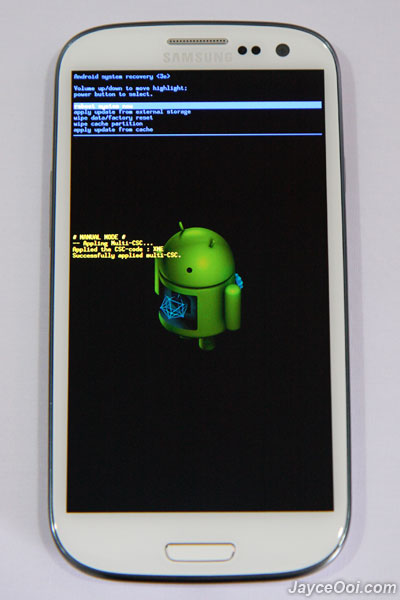
Samsung Galaxy S3 Android system recovery <3e> mode
How to load Samsung Galaxy S3 Recovery Mode?
It is always recommended to perform wipe data / factory reset and wipe cache partition before install new Android ROM. So recovery mode will be useful then.

Good guide jayce
for all samsung s3 user..tq2
Hi….any good root guide for S3 and didnt reset the counter ?
Thanks
Video guides are coming soon at my blog. Or you can get it from XDA website now.
Or sammobile.com (previously known as samfirmware.com ; )
For some reason my photos on the camera album have disappeared on my s3. Can you help me with this?
Hi James, try to find it. If still cannot, consult Samsung Support. Maybe they can help.
hi James, my samsung S3, not open recovery mode after performing volume up + home + power button. please guide me.
Hi sheaz, what did it come out then?
hi jayce. would you mind to help how to reset the flash binary counter. currently im using the stock firmware on my S3 4.1.2 and already downloaded the triangle away from google play. however im unable to access the triangle away. do i need to install something else or i need to root my s3 again. mind you that my s3 have 2 counts of flash binary counter
Yes khairil, you need to have root access to use Triangle Away.
Hi there! I tried upgrading my S3 firmware to 4.3 (think that’s the right version) but at a point it took too long as it stalled for more than half an hour. So, I just switched it off and went home. Afterwards I tried turning on my phone again but failed.
Basically, i can’t get it loaded and turned on to use all the usual functions. Tried using Kies at home (slow broadband and using Kies) but failed. So, i searced Google and found this webpage and tried your recommendation i.e. How to load Samsung Recovery mode. I wiped out data and cache partition, like you said, and reboot.
However, after I clicked on apply it took me to another page asking me to choose a package to install: /cache. with options of ../ ; lost + found/ ; recovery/ . I tried all options but still failed to load. Please advice. Thanking you in advance..
Hi Vincent, try to restore stock firmware see.
http://www.jayceooi.com/2012/06/14/how-to-restore-stock-firmware-on-samsung-galaxy-s3-video/









