










Overclock is the easiest way to improve performance on Samsung Galaxy S III. Samsung Galaxy S3 Quad Core Application Processor is clocked at 1.4 GHz by default. However, you still can push its limit and improve overall Samsung Galaxy S3 performance by overclock up to 1.8 GHz. Official Samsung Galaxy S3 kernel does not support overclock feature. So you need to install custom kernel for Samsung Galaxy S3 in order to overclock.
Note – overclock will reduce Samsung Galaxy S3 Quad Core Application Processor and other hardware components lifespan because it will overheat easily. Do it at your own risk.
How to overclock Samsung Galaxy S3?
- Install Samsung Galaxy S3 custom kernel that support overclock.
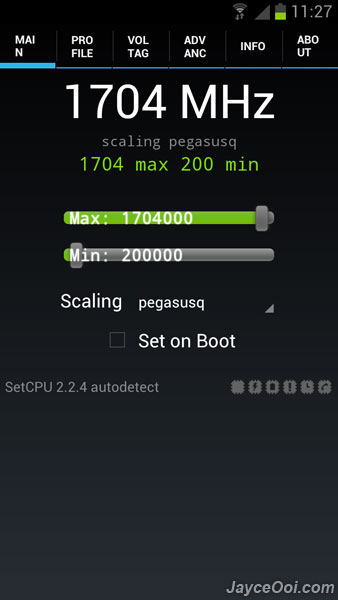
- Install SetCPU.
- Slide the max bar to the speed that you wish (like above picture).
- Run Stress test ~ Stress CPU to test stability (located at Info tab).
- Or test the stability by playing 3D games (which use most of the CPU / GPU power).
- That’s all.
Note – Only check ‘Set on Boot’ when you are confident that the overclocked speed won’t hang and stable all the time.
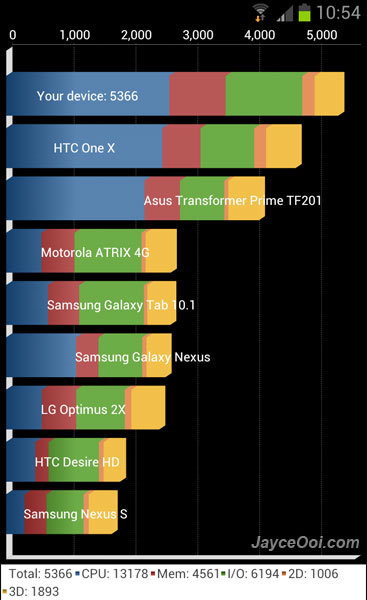
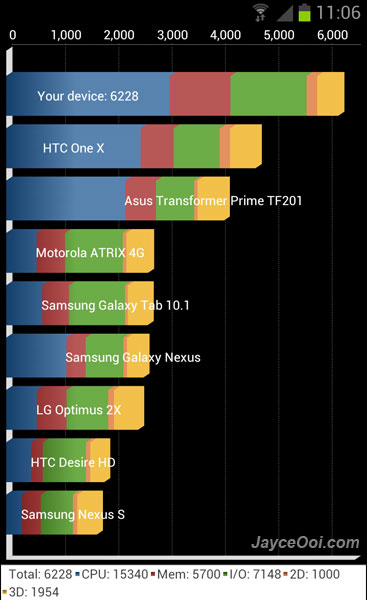
Quadrant benchmark score increased 16% by overclocked to 1.7 GHz. This increase overall Samsung Galaxy S3 performance. And that is the highest speed that can be achieved on my Samsung Galaxy S3 for the moment. Need to fine tune the CPU voltage if I need to push it further.










