










How to enable call recording on Samsung Galaxy S III? You can find lot of call recording paid and free applications in Google Play Store. And use it on Samsung Galaxy S3. Or you can enable call recording on Samsung Galaxy S3 by reactivate official Samsung Galaxy S3 firmware hidden feature. Note – root access is required.
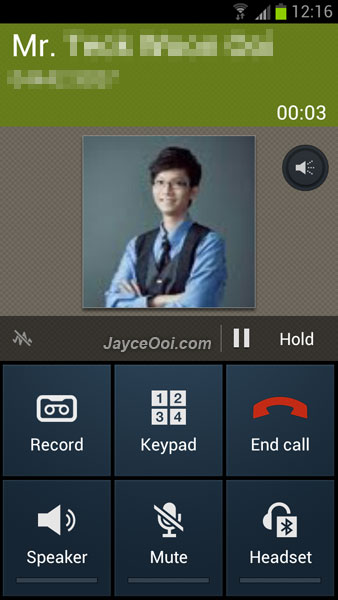
Call recording on Samsung Galaxy S3
How to enable call recording on Samsung Galaxy S3?
The hard way ~ decompiles SecPhone.apk with APK Manager. And make few lines changes. Full guide can be found at XDA website here.
Or the simple way ~ install CheckROM EvoHD ROM for Samsung Galaxy S3. Then install Phone Mod V2 S3 which disable increasing ring and enable call recording with KitchenPro.
Enjoy call recording on Samsung Galaxy S3…

Tags: Android, call recording, CheckROM, KitchenPro, Samsung Galaxy S3
How to get the root acess Jayce?
http://www.jayceooi.com/2012/06/09/how-to-root-samsung-galaxy-s3-with-cf-root-video/
I kinda miss the increasing ringtone, is there any way to get BOTH call recorder and increasing ringtone?
Use the hard way.
the ‘hard’ way has disabled increasing ringtone too :S Oh, hey jayce are you using checkRom or Omega now? was thinking of moving to checkRom (from omega) after hearing everyone’s reviews..
which do you think is better, checkRom or Omega? ( I mean, they are different i know. just want to hear your thoughts.)
Using CheckROM now. Still don’t have chance to try Omega ROM yet.
If rooted then the warranty will be VOID right?
Yes, but you restore back to stock firmware to save warranty.
http://www.jayceooi.com/2012/06/14/how-to-restore-stock-firmware-on-samsung-galaxy-s3-video/
Is there a remote possibility that Samsung S3 comes up with call recording in one of its updates?
I don’t think so because not all countries allow call recording legally.
Hi Jayce,
You seem to know a lot! I need your help!!
Can you please let me know how to enable official hidden call recording feature on Galaxy Y Duos S6102? Thanks in advance!
Sorry Chris, I don’t have this model. No idea…
I have samsung note GT-N7000 AND ANDROID VERSION IS 4.0.0. i NEED TO RECORD THE CALLS WILL IT BE POSSIBLE TO GET THE HIDDEN RECORDING FEATURE ACTIVATED. tHANKS
Hi SAM, I don’t have Galaxy Note. Not sure about that. You can try to find at XDA website.
http://forum.xda-developers.com/forumdisplay.php?f=1346
Once recorded… where are the audio files saved? What format? and how to listen them from the phone? can those files be exported to computer to hear them with windows player?
I forgot. Sorry, try it yourself to find out…
Hey Hamley, did you ever find out about where the call recording are stored?? Cheers
/mnt/sdcard/sounds
I was searching for a call recorder for my Galaxy S3. Hope this app will work for me. Thanks for sharing.
hi Jayce
where can i find Phone Mod V2 S3 ?
i searched it, no success !
sorry…
cleared that
thanks anyway
nice tut…
hi, nice post.
it is easier to download a Call Recorder app. I suggest – NG Call Recorder.
have fun :>
Hi Jayce,
How to install Phone Mod. Please!
Please refer to the installation guide at XDA. Or install with KitchenPro if you are using CheckROM.
Thanks Jayce, I just installed the CheckROM but after I restored my backup data, the KetchenPro is gone. Note only that, seems the checkROM is gone and replaced by Samsung origin firmware. Right?
How did you restore your backup data?
1. I restored by CWM.
2. By the way, I reinstalled CheckROM again. But when I choose to install MODs from ChickenPro, for example, Phone MOd V2 S3. There is only “Mark for Installation”. What can I do next.
3. Am just new android user. Sorry for silly questions, perhaps!
Press Menu – select Download & Install Packages then.
Million thanks to u, Jayce. Cheer!
Now am using CheckROM V5.6. How can I restore my data or apps from my backup file? (full backup by CWM)
Hi Khang, try this method.
http://www.jayceooi.com/2011/08/24/how-to-backup-restore-all-apps-and-settings-when-upgrade-android-rom/
Hi Jayce,
Any idea y my ChickenPro has only widgets/apps tab, other tabs tabs are gone. That means I can only install whatever are availabe on this widgets/app tab.
One more thing is Flash Player. I think the flash player is missing from CheckRom V5.6? How am I gonna install flash player? I search from Play Store, is not there as well, uhumm..
Thanks
Yes.
http://www.jayceooi.com/2012/08/21/download-adobe-flash-player-apk-for-android-devices/
Thanks Jayce,
How is my question about ChickentPRo. U have any idea pls?
Yes, you can only install whatever are available there.
What I meant is why the all tabs are gone from ChickenPro except widgets/apps tab. For example, i want to install the Phone Mode but it s not there any more….
(
Yes, I am facing the same stuff as well. ROM chef removed those stuffs on older version of CheckROM to save server disk space (I think).
Hi Jayce,
I’m rooted and running stock Rogers (debloated)… Wondering if there is anyway to enable this? It says on XDA that the hard way only works on deodexed roms…. I think stock roms are odexed though?
thanks in advance!
Matt
Sorry Matt, I don’t have Rogers SGS3. No idea. Maybe you can consult others with same model at XDA Forum.
Hi Jayce,
I have stock I9300XXELKC will this work?
Thanks.
Hi Ese, I think the manual way should work. But I did not try it myself.
Thank you for your response
and how do I know if my phone is deox or not?
Stock firmware is odexed.
I have galaxy s3 and would like to know what is the best call recorder get. I had paid version of total recall and it stopped working after update, model SCH1535 and 4.1.1,do you have any idea what I need to get it working again. My phone is not rooted.
Sorry lloyd7179, I have no idea because don’t own this model.
I just installed checkROm and my phone is completely dead! wont turn on anymore
I am trying to be able to record my call on my S3. Not phone friendly and dont understand your easy or dificult ways to do it.
can you guide me >?
thansk in advance
Martin
Hi martin, please take time to understand it then.









