










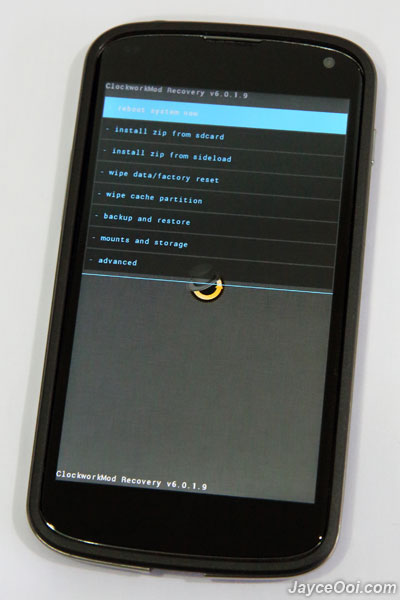
How to install ClockworkMod Recovery (CWM) on Google Nexus 4? The easiest way to do so is to use the 1 click method when root Nexus 4. Or you can also install it manually. Check out this post on why you should have ClockworkMod Recovery (CWM) on Nexus 4.
Prerequisites
- Unlock Nexus 4 Bootloader
First of all, you need an unlocked Nexus 4 Bootloader to install custom recovery, ROM and so on. And get Google Nexus 4 ToolKit and Nexus 4 adb & fastboot drivers ready to ease your life too.
How to install CWM on Google Nexus 4?
- Boot into Nexus 4 Fastboot Mode.
- Connect USB cable to Nexus 4.
- At Google Nexus 4 ToolKit, select 6. Flash Recovery [Custom or Stock Recovery].
- Select 1. Flash Clockworkmod Touch Recovery 6.0.1.9.
- Select Yes to continue.
- That’s all.











Pretty much the same plan worked when I Cyanogenmodded my Nexus S, which is still adequate although I’m starting to feel that single core is no longer enough. Nexus 4 is looking pretty great in the hands of my colleagues though 🙂
You wrote this article a week ago, you should be knowing that the Nexus 4 toolkit does NOT work on Nexus phones on Official Android 4.2.2 as the Build is NOT supported by the toolkit software as yet…
Maybe some research before posting such a article would be a good idea…
Huh? Mine is working as above picture on Android 4.2.2. Why it does not work?
I downloaded and installed the Toolkit and donated to the developer. I unlocked the bootloader and rooted the Nexus 4. Do not think CWM installed as I cannot boot to recovery mode. The toolkit boots from ADB mode to Fastboot but fails to transfer a file(s) and then patiently waits for ADB mode which never happens. Cannot change to insecure.
Just consult developer directly then.