HTC HD2, knife, keys and scissors are friends. Woo… Check out this video on HTC HD2 large capacitive glass touchscreen make friend with knife, keys and scissors. Damn… I am sure that I won’t do this when I get my HTC HD2. Ouch… That fellow might be hurt.
05 Mar
Posted by Jayce Ooi as How to, Programming
How to read and write Windows System Registry Keys and Values? I need to create a value at Windows System Registry for my project lately. It is used for SCOM discovery. I need a Windows System Registry key to determine that the server is the server that SCOM going to monitor.
First thing to do in your C#. Add using Microsoft.Win32; RegistryKey and Registry requires Microsoft.Win32 as the assembly reference.
Here are the codes that write Windows System Registry Keys.
RegistryKey JayceOoiKey = Registry.LocalMachine.CreateSubKey(“SOFTWARE\\JayceOoi”);
This will create key JayceOoi under HKEY_LOCAL_MACHINE\SOFTWARE\.
To read Test string value from HKEY_LOCAL_MACHINE\SOFTWARE\JayceOoi\
string Output = JayceOoiKey.GetValue(“Test”);
These are the methods that I use to read and write Windows System Registry Keys and Values. Hope it will help in your programming work.
ASP.NET C# Input TextBox value by pressing Enter key. Huh? I want to get the value of the textbox without click on the submit button. But getting the textbox value by just pressing enter key on keyboard. How am I going to do so? The page just refresh if I press enter key. I want the enter key link to the submit button. Therefore, whenever I press enter key, I will get the textbox value.
Here is the solution to get it done. By adding defaultbutton variable in form or asp:Panel will solve it.
Code example
<form id=”form1″ defaultbutton=”Button1″ runat=”server”>
<div>
<asp:TextBox ID=”TextBox1″ runat=”server”></asp:TextBox>
<asp:Button ID=”Button1″ runat=”server” Text=”Button” OnClick=”Button1_Click” />
<br />
<asp:Label ID=”Label1″ runat=”server” Text=”Label”></asp:Label>
<asp:Panel ID=”Panel1″ defaultbutton=”Button2″ runat=”server”>
<asp:TextBox ID=”TextBox2″ runat=”server”></asp:TextBox>
<asp:Button ID=”Button2″ runat=”server” Text=”Button” OnClick=”Button2_Click” />
<br />
<asp:Label ID=”Label2″ runat=”server” Text=”Label”></asp:Label>
</asp:Panel>
</div>
</form>
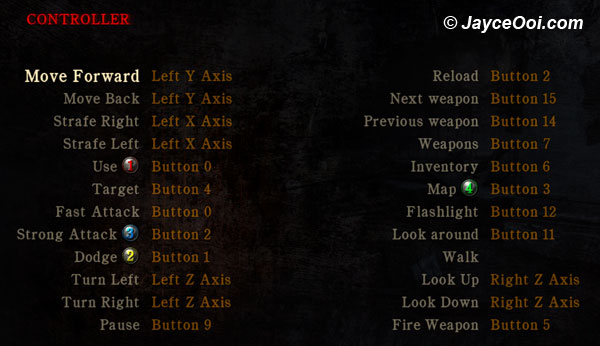
Setup Silent Hill Homecoming USB PS2 joypad controller key. Huh? Why do you need to setup Silent Hill Homecoming controller key? Shouldn’t you can change it at the setting page? Hmm… I am not sure why. But all the key that I set at Controls page turned back to default after exit Silent Hill Homecoming. And I failed to make USB PS2 joypad controller right analog control stick to work. Therefore, I come out my own solution for this Silent Hill Homecoming USB PS2 joypad controller key issue.