










Microsoft Windows is very stable now. No need to format Windows when system crashed. I still remember the day when using Microsoft Windows 95 / ME. Windows is not so stable and tends to crash if the applications do not running well. Boot disk is a must have to troubleshoot. I was using floppy drive and CD ROM as boot disk back then. But it is replaced by USB flash drive nowadays. How to make USB Pen Drive bootable? There is a tool called Makebootable from PenDrive that can make your Pen Drive bootable.
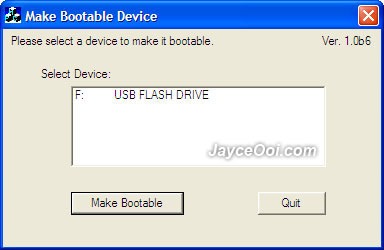
Makebootable System Requirements
- Microsoft Windows 98 / ME / 2000 / XP
- Pen Drive using Phison’s solutions
- Motherboard / BIOS with USB boot support
Makebootable is an old application and only working on old Microsoft Windows rather than Windows Vista / Windows 7. Further more, it does not support FAT32 and NTFS file system format. So you need to format Pen Drive as FAT. I tried to use it on Apacar flash drive. I was able to make the flash drive bootable with Makebootable. 4 files (COMMAND.COM, DRVSPACE.BIN, IO.SYS, and MSDOS.SYS) were copied to it. However, I failed to make it boot. Must be setting issue else is my GIGABYTE EP45-DS3 motherboard issue (no matter I select USB-HDD or USB-ZIP). Anyway, no harm try it out as it might work for you.
Download PenDrive Makebootable here.










nice tip bro..
how about for Windows 7?