29 Mar
Posted by Jayce Ooi as Software
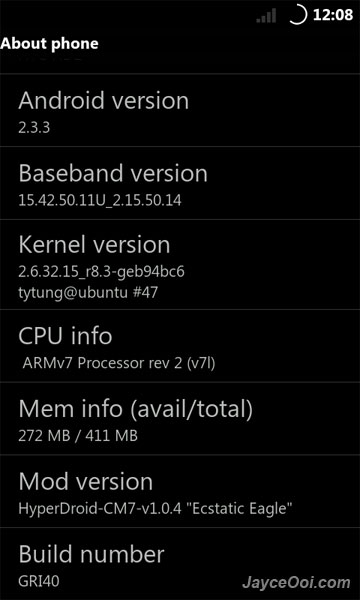
HyperDroid CM7 is another build from XDA Developer, pongster. It is built from the source (CyanogenMod 7) and tweaked for performance. As usual, I changed it LCD density to 240 because I don’t like the default 167 density. This ROM is based on Android 2.3.3 Gingerbread and using Tytung r8.3 Kernel.

HyperDroid CM7 on HTC HD2

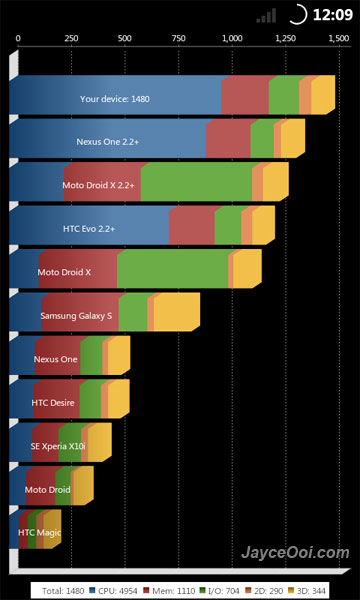
Quadrant score

ADW Launcher

Software information
Make sure that you change ro.sf.lcd_density=167 to 240 at build.prop (system folder) before you install the ROM if you want normal screen density.
SD card partition guide ~ How to create ext3 partition on SD card with ClockworkMod Recovery?
Installation guide ~ How to Install NAND Android on HTC HD2 with ClockworkMod Recovery? (Video)
Download HyperDroid CM7 v1.0.4 [Kernel: Tytung r8.3] NAND A2SD+ Zip ROM here.

via: xda-developers
Tags: 2.3.3, A2SD, Android, CM7, CyanogenMod, Gingerbread, HTC HD2, HyperDroid, HyperDroid CM7, NAND, pongster, ROM, Tytung, xda-developers, zip
[...] greatest Android ROM based on Android 2.3.3 Gingerbread that you should try. BOYPPC-SHIFTPDA GINGER HyperDroid CM7 Ultimate Droid 3.1.1 NexusHD2-Gingerbread HyperDroidGBX TyphooN CyanogenMod 7 RC2 Tags: 2.3.3, [...]
HyperDroid CM7 looks awesome, I will try it.
How do you modify build.prop ?
The file is in 644 mode and my text editors do not run as root.
I heared about root editor but it is not free.
Is there an esay and free solution ?
(sorry I am a newbe)
I edited the file with 7-Zip before install it. It is free.
Did not thought to do it this way, it’s easy !
Thanks a lot.
Jayce,
Tad bit confused as to how to change this LCD Density build.prop file. I have installed HyperDroid NAND that had the DAF flash installer. Is there any way to change the build.prop file once it is installed, or how would I edit that file in that version?
Use Root Explorer to edit the build.prop in your case.