







13 Mar
Posted by Jayce Ooi as Software
Yes, the wait is over. You can download and install official Android 4.0 Ice Cream Sandwich Firmware for Samsung Galaxy S II now. Samsung released official Android 4.0.3 ICS XXLPQ Firmware for Europe region. As usual, you can install this ICS XXLPQ Firmware on other region SGS2 I9100 model too. For those who can’t wait for official ICS release on Samsung Kies, you can install this Europe ICS firmware with Odin software now…
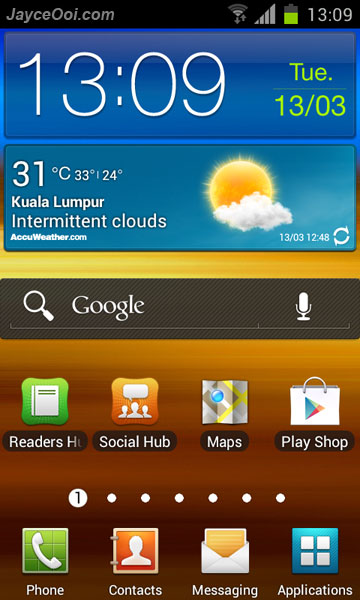
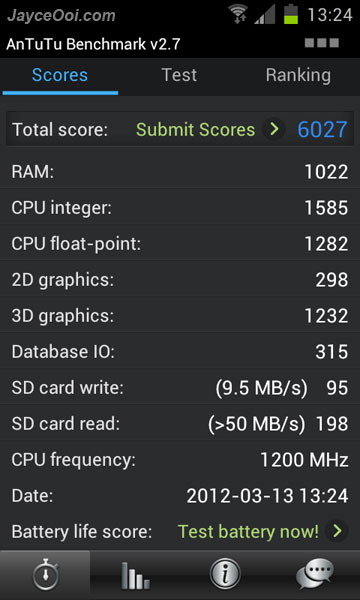
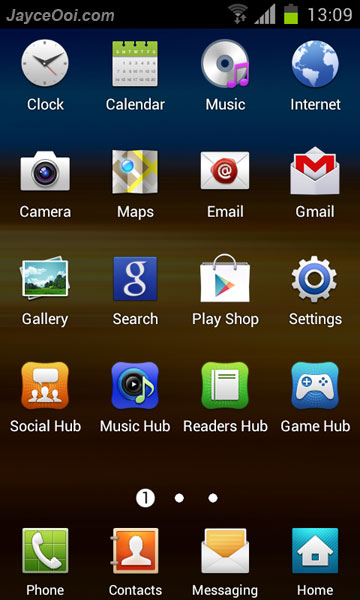
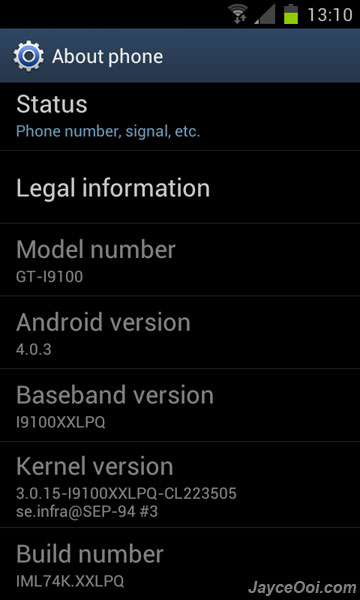
Official Android 4.0.3 XXLPQ Ice Cream Sandwich Firmware for Samsung Galaxy S2

Antutu Benchmark score

TouchWiz Launcher

Software information
Well, this very first official ICS firmware for Samsung Galaxy S2 is good. What are the new features? Android 4.0 Ice Cream Sandwich goodies like face unlock, data usage, hardware GPU acceleration are included of course. Performance is good too as you can see from Antutu Benchmark. Battery life? Need time to find out that. Can I root it now? Need to wait for XXLPQ CF-Root or use Odin Mobile Pro to install it (and get rooted automatically). Anyway, do try it out and enjoy ICS on your Samsung Galaxy S2…
Installation guide ~ How to install firmware on Samsung Galaxy S2 with Odin?
Download official Android 4.0.3 XXLPQ Ice Cream Sandwich Firmware for Samsung Galaxy S2 here.
via: xda-developers
Tags: 4.0.3, Android, firmware, Ice Cream Sandwich, Odin, ROM, Samsung Galaxy S2, xda-developers, XXLPQ
Dear Mr.Jayce,
Wow…. :O could show us about what work and not work?
Thanks,
BR,
Will post it when I gather more info.
Thank your reply
Hi Mr.jayce, now my SGSII running MIUI ROM so if i want to use the official firmware 4.0 i must restore my stock ROM first right?
Should not. Just wipe data and cache in CWM first. Then install ICS with Odin.
Ok i got it, Thank you very much Mr.jayce
Hi Mr.Jayce,
could you tell me about what is latest kernel’s name of samsung Galaxy SII? b.coz i want to update the latest official firmware 4.0 on my SGSII. Thanks in advances
Hi KAKA, there are several kernels for SGS2 like SiyahKernel, SpeedMod… You can find most of them at XDA website.
http://forum.xda-developers.com/forumdisplay.php?f=1058
jayce
i upgraded to modded ics I9100XXLPB (android 4.0.3)
now kies show that my device does support to upgrade via kies even my device is rooted
how upgrade my fone to the official upgrade…
pls help
Just upgrade with Samsung Kies.
i m trying to upgraded with kies
but it is showing the message that
“”"your device does support to ugrade with kies”"”
@Jayce
i got csc_I9100ODDLP9(84.8 MB)
I THINK IT’S INDIAN VERSION PLEASE CAN U LOCATE ME
PHONE FILE AND PDA FILE TO UPGRADE MY GS2 I9100 USING “ODIN”
PLS HELP YAAR
hi Jayce,
i’m in the process of updating to ics 4 but Odin says Please Wait for almost 45 minutes now. nothing else is happening. do u think there’s a problem? or should i wait longer?
how long did your update to ics for galaxy s2 take?
please help me. am worried.
chris
Yes, nothing happen is wrong. It takes around 5-10 minutes only.
Hi Jayce,
Thanks to u i managed to load ICS on my galaxy s2 + ROOT .
I have downloaded DROID WALL. Do u have a list of apps that i can block?
I also got TITANIUM BACKUP. Do u know what bloat ware apps i can uninstall?
I appreciate
You can block whatever apps that you want.
Only uninstall those you know.
ICS finally, great news, thanks Jayce.
Is the upgrade from CheckromHD problem free? And does the upgrade wipe installed apps and settings?
No issue on my phone. This official firmware is non wipe version.
Good to know, thank you.
the download is too slow……..
download speed is too slow
anybody have another link?
http://forum.xda-developers.com/showthread.php?t=1544111
Check out the link over here for more downloads, and this is an official firmware so, no worry about the wipe/nonwipe…
you can confirm the info yourself.
https://twitter.com/#!/samsungmobileus
Hi Jayce,
My SGS is on Gingerbread 2.3.5. Will installing this wipe my device?
Should not. I was upgrading from 2.3.6. All apps and settings are still there.
hi Jayce the link I gave is broken … keeps giving me an error
Hi Chris, please use other download links from XDA website.
Great news, but 14 hour download? Seriously?
4,5MB in 30 minutes is way to slow
If I upgrade from a rootet phone with FOTA, will it be unrooted?
FOTA is faster than this download, but i want to keep the rooting features
This official firmware will unroot if you install with Odin and FOTA.
Ok thanks. Is it possible to root it again after upgrade?
Yes, Bjankks.
Dear Mr.Jayce
The SEB version has language Spanish (Spain) and muti csc? Thanks you
I don’t see Spanish Language there.
Does this work on i9100G??
Nope I don’t think so. i9100 and i9100G are both different phones with different hardware
Need to know a few things.. im using a stock rom but rooted.. but kies says my phone cant ve updated via kies. So am i to belive that if we root, we cant SW update via kies?.
We we follow that video guide, all my current apps and files from my 2.3.6 will still be intact?
Just wanna know if this Firmware is really worth the update? CM9 is coming soon i guess
The problem is not related with root. I have root and I’m able to update through Kies. This occurs when someone uses a sales code (CSC) not compatible with stock rom. If you want to update through Kies you shoud use the stock rom of your CSC or change CSC (but changing CSC wipes everything).
ic ic.. oww.. so in order to receive updates i have to change the CSC which will wipe everything..
.. i think i knw what u mean .. that KOR XPH stuff .. neways thnx guys
Yup, just like Nuno said. Rooting does not affect software upgrade with Samsung Kies. Wrong CSC does.
Yes, all apps and settings will be intact. This is non wipe firmware.
Depend on your usage. CM9 is here already but not perfect yet.
hmmm thnx jayce… will be waiting to read ur review on this F.Ware.. TQ
hi guys, i have this problem with Kies so I guess i have the wrong CSC in mine. when i upgrade to the offician ICS update will this resole the problem or will i have to wipe my phone and put in a new CSC first?
thanks
Depend… You need the correct firmware region + CSC combo in order to make Samsung Kies works.
kies says my phone cant be updated via kies. …… GT-i9100G……… what should i do…& how I can i do it……what is CSC?…….i’ll be grateful…..if anyone can help me
Hi jordan, did you install custom firmware on your I9100G? Install back official firmware will do.
CSC == consumer software customization
When i bought it..it was 2.3.4 after few days it was autoupdated to 2.3.6.
Now if i check for update it says that no upfate available.
Actually my phone continuing crash when i listen songs…. Is this gonna be change if i change my software version?
Hi jordan, look like you are using official firmware, please consult Samsung Support. They will provide better answer.
hey borther i m form india ..this ics 4 iz offical?? and which region ?? india???
It says Europe
Hey there, Is it possible for you to post an article when checkrom is upgraded to this version? It would really help me out a lot, as I mostly go to your website for updates. Thanks!
Sure will post it as I am going to try it too.
Thanks!
Hello bro.. i am from india…i am eager to know whether flash is fully supported in dis version?
It is supported.
Thankzzz a lot bro..
hi Jayce
the firmware link is not working?
Server too busy. You can try other mirrors at XDA website.
Jayce..I’ve installed this new firmware and how i need to go back to the my old firmware and i’ve backup it thru CWM..thanks
Jayce..one more thing..can i root this firmware..is it the kernel available to root it.
Yes, root it with CF-Root. Then you can restore your previous backup then.
Dear Jayce To Installing This Firmware Root Is Necessary ?
And Is Official Samsung Apps Include In This Firmware ? Like –
((Social Hub,,Games Hub,Allshare,Voice Command And Voice Talk,Samsung Apps Etc…))
And Will This Rom Work In India ?
Sorry For My Bad English…Please Reply Soon I’m Eagerly Waiting To Install This Firmware…
No.
Yes, this is official firmware.
It works in Malaysia. So should work on other region too.
Jayce Firmware Download Link Is Not Working..
Please Update The Link And I Cant Download Via XDA Devs Site…
Server is too busy. Try others mirrors at XDA website.
But Jayce Where Is Other Mirror??
There Is Too Junk Of Words…
Many Users Should Have Problem…
Please Post a Fresh Link.If Possible…
Hey Jayce, does this work for the GT-I9100G?
No Jibraan.
This question has already been asked.
No it will not work. the GT-I9100G has different hardware than the GT-I1900.
Sorry for the re questioning. Any ideas when it will be out?
You need to consult Samsung directly. No info given on I9100G model yet.
Hi Jayce
what is the different of baltic (SEB) version and the official version?
SEB version is Multi-CSC package and also official version. Didn’t try Poland version. So no idea.
Hi !! I got it is so cool!! but i have problems changing the wallpaper for a pic of my gallery… Do you have the same problem??
Thanks!
Same here. Force close.
Huu that’s bad .
exacly the same with me. Force close.
I fixed man. Just restore your phone, mine start working after restored it.
what do you mean with restoring the phone?
do i have to use odin again?
Nop I mean restore from the phone options.. But i found out the proble,m is because the gpu aceleration option, if you uncheck it you won’t have the problem anymore. This option is in the developers options menu into settings
Hello, Jayce,
How are you today, firstly thank you for your posts.
Secondly i have rooted SGS2 with 2.3.7 version, so now i want to upgrade to this official ICS version, i have to do it with ODIN?
Thank you,
Yes mao. Or wait for official release for you region with Samsung Kies.
Thank you.
Hi,
I installed this version using ODIN3 as shown on the installation guide, its said PASS! on ODIN and i rwmoved the USB cable from my phone, and started normally but stuck on S sign Samsung Galaxy SII?
HELP!
Thank you
Factory reset in recovery mode.
http://www.jayceooi.com/2011/07/18/how-to-hard-reset-samsung-galaxy-s-ii/
Thank you Jayce, Have a nice day.
Just use Mobile Odin Pro to install it for rooted functions. Download the firmware, extract the .tarmd5 and put into your sd card. then from your phone, use Mobile Odin Pro to install the ICS firmware. It will be non wipe. Go on XDA forum to get more details.
Is the i9100G can use the same procedure when upgrading to Android 4.0 Ice Cream Sandwich? Mine is this i9100G model
Also mine is stil not rooted yet though. Hehehehe…. But still, can it be done when rooted? If its still can, surely why not.
No root access is needed when install firmware with Odin.
Yes, when it come out for I9100G.
when will official ics be available in South Africa
No idea. Please consult Samsung South Africa.
I’m currently on MIUI 1.11.25 (pretty old!). How can I remove it and install the official ICS 4.0 firmware?
Is it worth installing, or should I wait for any custom rom and install that on my S2? Which ICS rom you’re using/will be using?
Wipe data and cache in CWM first. Then install ICS with Odin.
Depend on your usage. Some apps are still not compatible with ICS. Looking forward for CheckROM ICS ROM.
hi jayce, am still running on checkrom hd v.6. can i directly upgrade this to ICS using odin right away, or should i go back to the official samsung gingerbread?
thanks
Should be okay, I upgraded from v4.
i see..so in our case it’s official of saying “goodbye checkrom?” :0
as from my experience checkrom has no to little bug issues. am still skeptical on switching to official ICS. i read some comments that they’re experiencing some issues.
in your opinion/suggestion would it be nice to upgrade to ICS and leave permanently the checkrom or should i bit a little longer to stabilize the ICS?
thanks
Nope. ICS is still considered new. Some apps are not fully support yet. Will go back Gingerbread after finish playing ICS.
yay..so i’ll stick w checkrom for now..thanks for your time jayce
how can i go back to gingerbread?
Hi moussa, download Gingerbread firmware. Then install it with Odin.
http://www.jayceooi.com/2011/08/14/how-to-restore-stock-firmware-on-samsung-galaxy-s2-video/
Hi Jayce,
I hv succesfully installed XXLPQ and rooted using CF Root… All of my apps restored but having problem with 2. One of them is Merriam Webstar Dictionary. They can’t be installed in XXLPJ too. Any suggestion?
Maybe it does not support ICS yet.
Service Unavailable
HTTP Error 503. The service is unavailable. the download link is broken
Hi Mr Jayce, I am interested in installing this firmware but I am just curious about the battery life. Is it good? Tks.:)
I have installed this and found that the phone tends to stay warm and battery drained faster than my previous GingerBread 2.3.5. Not sure about the others.
Doing lot of testings on ICS. Can’t measure yet as I am using it more than usual now.
Oh ok. Will be waiting to hear your results.
Hi! Jayce! Just installed the firmware. Looks good! But my phone tends to hangs and reboot itself. Why is it so?
Maybe your existing apps do not work on ICS. Try to factory reset it see.
Hi Jayce, after done all, it just like an update and everything is still remain. What should I do like “reformat”and start with the ICS 4.0?
Factory reset it.
hello…does this version support arabic language ..plz answer befor i download ,,thanx
Can’t see it.
thank u
hey is it suitable for my sgs2? i am from Greece? i mean is it official???
It is for I9100. Official firmware.
i am from Greece!!! i meant
Hi Jayce,
I just tried this rom, is this official rom? a few things missing, 1)The dial pad is still the same from 2.3 2)transparent notification bar. 3)the homescreen UI still look like 2.3 though it should have been changed.
Thanks in advance.
Yes, official. But still got bugs.
They will fix this in “Software Update” right T_T
how to perform Factory reset in recovery mode for sII gtI9100
http://www.jayceooi.com/2011/07/18/how-to-hard-reset-samsung-galaxy-s-ii/
Interface & Icon are same in Official Android 4.0.3 XXLPQ ROM!!!:S There is no similarity between this & leaked ICS 4.0.3 ROM!!! Hard to believe that this is Official Android 4.0.3
I’m so sad:(
Will this work for the US version of galaxy s2 (sgh i777)
Nope, it is for I9100 only.
Eh~ Is there anyone updated and work fine with the PRINT SCREEN…? Or just mine ==”
Press volume down + power buttons to take screen shot in ICS.
Ah~ Stupid stupid stupid! I’ve confuse the POWER and HOME button…
Thanks a lot!
Hi, i still cannot manage to print screen on this new upgrade please help? i use to press home and the lock screen button together but now it doesnt work…
Hi Cb, press volume down + power buttons to take screen shot in ICS.
Thank you! Ive figured it out now. Just had to hold it a few seconds longer instead of pressing and letting go straight away!
this doesn’t work for my phone.
this doesnt work on my phone too… it works before the sofeware update…
please help =/
Hi Jayce, the guys GalaxyS2root claim that the resurrection remix v9.4 and v9.6 ICS roms are much superior than the official ICS. Do you have any experience with these roms? Thanks
Nope, didn’t try anyone of them.
Will this update work on a branded phone? Will it work in Canada? Will it work on a 1900m model?
Hi bill, not sure about that since I don’t have one to test. Please consult others who has the same model at XDA website.
Hi Jayce;
iS This Version Stable? Any Bug? Any Problem?
Do U Suggest This Version?
Not 100% stable. Certain apps can’t support ICS yet.
Not recommend ICS for the moment.
Hey Jayce, I’m in deep confusion. I found 2 sizes XXLPQ ROM on xda-developers site!!! one is SEB 327.1MB(yours too) & another is XEO 381.1MB. What does SEB & XEO means???? & Which is better? & Why those files size are different??? please reply me…..
Different region. No idea as I did not try XEO build. Zip software compression ratio is not same.
Thanks for the reply…..
Files size not that much difference,SEB 327.14MB and XEO version is 327.08MB.
SEB = Baltic country XEO = Poland.SEB file has more CSC package,XEO just have 6 CSC.So SEB file size is bigger than XEO.
CSC – Consumer Software Customisation (specific to geographical region and carriers).
Hey bro XEO file size is 381.1 MB not 327.08 MB. Check this out —> http://www.netload.in/dateipxhXTIWE6B.htm
Do find at XDA site or others site
which one is better SEB or XEO ??
Does your phone have to be unlocked to run this unbounded firmware or can I just flash my phone which is running stock firmware directly?
My phone is factory unlocked version. So no idea…
Alarm library sound couldn’t hear, also xxlph version had this problem. They couldn’t correct this. Do you notice that?
Didn’t notice it.
Hi Jayce,
Do you have any idea how to do the screenshot with this firmware version?
Thx in advance
Hi Augustine, press volume down + power buttons.
average life of the phone is 10 to 12 hours in two days that I just installed ics 4.0. without using a long time, just enough, check some email, watch a video on youtube, no games, no Internet surfing, is it normal for this time? before had android 3.5 and the battery lasted almost a day or more. would appreciate your answer, how long does the battery you.
Hard to tell because I am doing lot of testing on it now. Use more than normal daily usage.
I saw some changes, the fluidity of change pages is slower, and do little to enlarge a page or a picture also shows slow, is this normal?, I use the dolphin browser and have problems, sometimes quits unexpectedly, or not responds maximize a youtube video. battery in a matter of going for the third day checking and see that the battery life is approximately 10 hours, very little. waiting for your evidence. thanks
I seldom use Dolphin Browser. No info about it.
In my experience the battery life is crap, the signal on internet is much lower and slower even with wifi. I converted back to gingerbread 2.3.6 and my battery life and internet connection improved again.
Hi there,
I noticed after flashing to this european rom the font has changed compared to my old malaysian 2.3.6 font. Any way of getting the old one back? This seems thinner and more unpolished.
You can install it back if you know the font format name. Too bad that I don’t know.
I think font name is chococooky..
Hi, Jayce
I just installed ice cream 4.0 last night. I just found that, Ice cream version RAM is using up to 400MB, is that normal? When i was clear memory, the wallpaper i set will disappear to original wallpaper.
Yes, ICS uses more memory than Gingerbread. Besides, I have issue to change wallpaper with Gallery.
Dear jaycee
Need your opinion on this, I did an ICS update to my sg2 19100 international model but afer succesfully made the update, I could not clear off the software update in my notification bar. I’ve tried to do the update as required but it keep on showing ‘process fail’. Any idea on how to get rid the ‘software update’ from my notification?
Thanks
Are you connected to Internet?
Yup i am connected to internet. Did you experience the same problem after flashing the firmware?
Nope, I managed to get rid of it.
ok then, but how did you get rid of that notification? Any idea?
Thanks
I just follow the instructions to sign up. Then it says no update. And gone.
I’ve had a GS2 for about 6 months now, my old phone was a N1 so I’m new to this updating of the firmware via Odin. I have an unlocked, unbranded GS2. CSC is I9100DBTKH1. My question if I flash this ICS firmware (CSC I9100OXALPQ) to my phone will it change my CSC to the CSC in the firmware? Thanks in advance.
Yes, it will change your current CSC.
Thanks,
I’ve read somewhere that this firmware has multi-csc’s, anyway to tell which one are a part of it without having to flash the phone?
It will flash along with the firmware.
For those who are already on ICS 4.0.3, just like to ask is it worth the upgrade? Seems to have some bugs?
My 2 cents… Wait for stable build. This build still has bugs.
Don’t do it. I converted back to gingerbread 2.3.6 mainly for batter life and internet connection. ICS is slow and battery drains quickly.
Ok thanks for the heads up.
Just FYI.. Samsung Kies is also doing the auto firmware upgrade, just found out now. This is for Singapore, not sure if the applicable to other AP countries
its using LP7 instead of LPQ
Can I use this firmware on my GT-I9100M (bell Canada)?
Not sure about I9100M since I don’t have it. Please consult others who have the same model at XDA website.
Hey Jayce, I’ve updated my S2 I9100 today with this XXLPQ firmware via odin. I got some problems in it. After every boot handset shows “unfortunately, JAVA has stopped” after that set hanged for 2 to 3 minutes then show “TWLauncher has stopped working” then again hanged for 2-3 minutes & then it runs smoothly but sometimes freezes. What should I do to get rid of it???:(
Hi Hasib, try to factory reset it.
I cant update via Kies. Im from the Philippines. Do you have A link so that I can manually download it?
Download link is in the article.
Where’s the link.?
In the article ~ here.
When Im trying to update my firmware via Kies, I always encounter this error message “FirmwareUpdate has stopped working
“.
Please consult Samsung Support on Samsung Kies issue.
Thanks , Jayce.
Alright!, so you mean, Im going to install the firmware via odin?
Please study my guide carefully.
Official version for Malaysia / Singapore / Indonesia already out. Ya, can hv a try today.
DXLP7
Firmware info
PDA:DXLP7
PHONE: DXLP7
Date: 10/03/2012
Android 4.0.3
http://forum.xda-developers.com/showthread.php?t=1075278
Thanks for the tip, Adrian.
I faced that problem for first 3 boot after firmware upgrade. Now its working pretty amazingly!!:) Now no problem no hang on my s2:) Thanks for reply…..
Jayce…. I have a big issue before download this update…
I had previously updated my GT-I9100 S2 , But it had some bugs Like
1- Force closed Face unlock
2- Force closed TouchWich Luncher
3- Was Randomly vibrating
4- Shut down was taking long long time
5- Ram was always over 560
6- Cell was hanging hanging And hanging Constantly With Vibration
So i changed it to 2.3.6
so my ques is
Is these bugs are also in This Update too::??
plz Let me know…
Thanks In advance
No during my testing…
Thanks
Pankaj, how did you change back to 2.3.6
which 2.3.6 are you using is it stable
hey jayce , i got an error when extract .. can u help me??
You might have corrupted copy. Try to re-download it again.
i downloadit two times but both times i got error…do you have another link of official ics.. i’m from pak. thanx
Please get them at XDA website then.
hey jayce ! can you please give me the link ..because i’m confused after errors..please ..thanx
Hi Jayce,
I upgraded to the official ics firmware from gingerbread 2.3.5 and I am not that impressed. My pone lags now and apps keep crashing when i run them. Maybe it’s just me. how do i downgrade to gingerbread 2.3.6? I tried installing the 2.3.6 firmware via odin using the same procedure i used for the upgrade but it failed.
Try to factory reset it first.
As for downgrading, you need to wipe data and cache in recovery mode first before install firmware.
I did a factory reset and wiped the cache after but odin now doesn’t recognize my device. I no longer get the yellow D:com when i start odin.
Huh? How can it happen? Factory reset does not touch bootloader at all.
I don’t know but the phone’s still working and i can’t connect to kies to sync back my contacts. i just want to go back to 2.3.6
Not sure about Samsung Kies as I do not use it.
is there anyway i can do this
Hi Jayce,
1. I am upgrading from Gingerbread 2.3.6 to this version using odin but after finish the installation process and restart, its stuck at the Galaxy S2 logo and cann’t get to it. I hv to install back to 2.3.6 and it is ok and can longin into. What is the problem ? Please help.
2. And one more thing way my phone keep on restarting but this problem solve when i remove the sd card.
PLEASE HELP. THANKS A LOTS!!!!
1. Wipe data and cache in recovery mode before install ICS see.
2. Try factory reset.
sorry, but how to Wipe data and cache in recovery mode before install ICS???
thanks
Something like this – http://www.jayceooi.com/2011/08/14/how-to-restore-stock-firmware-on-samsung-galaxy-s2-video/
Hi, I m frm nepal. Well just ICS 4.0.3 has been available here. However, when i tried to upgrade from Kies, it completes the first step (downloading components) but while downloading file for firmware upgrade starts it continues for 6-7 % and error occurs everytime. I m not able to upgrade new version. Any help???
Hi Sabin, please consult Samsung Support in this case.
Hi Jayce, I did the XXLPQ upgrade and rooted it, but my antutu score is way much lower than yours. I’m getting around 3900 – 4700+ only. Here is a link between yours and mine side by side in LYN:
http://forum.lowyat.net/topic/2264517/+1440&#entry49822651 (Post #1459)
I can’t figure out why my ram, cpu integer, etc is so low. Can give my some advice? Thanks.
My benchmark was ran on fresh installation (I factory reset it to stock). And SD card test set on internal SD card. Hope this clear up a bit.
Yes, I did that too. Of course upgraded from GB, but when I found my scores were pretty low, i did use CWM to wipe everything and also factory reset. AS for the sd card part, that I know… I hv a crappy sd card. But the question is the other hardware scores are half of yours.
No idea then. By the way, the SD card test result should be the same too if you set it to /sdcard (internal storage), not external SD card.
I’ve gone back to GB and did antutu again. Now I get 5918… used to have at least 6000. Anyway, this score is obtained with internal sd. But my score is still less than yours, only 79 compared to yours 95.
This is a non-G with SME. Hmm….. really puzzles me. Thanks mate. Congrats on tying the knots.
Hey im from canada i got a normal samsung galaxys2 done nothing to it that i know off and wondering if this is safe and if i should get it or wait this is ice cream sandwich right
You can try it if yours SGS2 is I9100 model. Else wait for official release from Samsung Kies.
hey jayce, what’s the difference b/w SEB and XEO ??
and which one is better?
No idea as I did not test XEO version.
Different CSC.
I am using samsung galaxy s2 – GT I9100T
Will this firmware can work in my phone or I have to wait for official release?
because i do not know the difference between I9100 and I9100T. Please guide me
Thank you
Sorry Chirag, I am not sure as I don’t have I9100T. Can you consult others who have same model at XDA website?
Hi Jayce
is DXLP7 is for Malaysia?
No Allen.
it should be official and compatible to Malaysia set right?
Yes Allen, for I9100 only.
Hi Jayce
Any idea how to wipe the internal SD memory?
Factory reset it with Format USB storage.
I only see wipe data/factory reset option but no factory reset with format USB storage
Huh? ICS removed that? I have no idea then.
what does wipe cache partition does?
As the words mean, clear the cache.
So its been a few days now since this rom has been up . jayce still waiting for your final report pls advice if its daily rom is every thing working . thanks
Hehe… I swapped back to Gingerbread. Because I missed Chainfire3D night mode, Voodoo Screen and JKay Theme. Will try ICS again when these apps are supported.
You can get more impressions on ICS here.
http://forum.xda-developers.com/showthread.php?t=1544557
Thanks jayce that means am stuck using 2.3.5 xxk13 of now and other stable roms in 2.3.6 for the sg2 pls advice thanks .
For me, I only upgrade firmware when there are improvements or new features. But I don’t see anything that I need from ICS yet.
So stay with your current firmware until you need something new from latest firmware.
thanks
Jayce,
Need your help on how to downgrade it to 2.3.6..Is it I just need to install the 2.3.6 rom with odin only .Since this ICS not quite stable.
Thanks,
You need to wipe data and cache in recovery mode first. Then install firmware with Odin.
Hi Jayce! I live in India and i dint got the ics update via kies till now! I saw how it looks on the websites and i dint liked the Touchwiz UI at all! So my question is should I install the CyanogenMod 9(which i liked it) or i should wait for the official release? What would be better?
Hard to tell which suit you better. Both Samsung and CM9 ICS are not perfect yet. You need to try them out yourself to find out more.
Thanks for Your Reply!
Hi Jayce,
I have upgraded my Galaxy S2 (Singapore version) to ICS 4.0.3.
After upgraded to 4.0.3, lock screen function doesn’t work and phone option menu doesn’t appear when press the power button. At the end, reverted back to gingerbread 2.3.6
I have tried XXLPQ (SEB), XXLPQ (XEO) and DXLP7 versions. All firmware were giving same result.
Did you have ever encountered these issues?
Thanks,
No, they are working fine. Did you wipe data and cache in recovery?
Are you referring to wipe data/factory reset and wipe cache partition?
I did try the wipe data/factory reset and the outcome was same. i didn’t try the wipe cache partition function.
Thanks
Yes Matt.
Hi Jayce, its me again
Does this “official Android 4.0.3 XXLPQ Ice Cream Sandwich Firmware for Samsung Galaxy S2 ” is available for any s2 phone???
its 327mb @@
For I9100 only.
the 327mb is the firmware?
Hey Jayce!!!
i use odin and download it on my phone…my phone now is same like the picture above
can i receive updates in future???
jayce…
why this is also v4.0.3 but its cooler than mine D:
http://www.youtube.com/watch?v=cBDQl6gPDVc
Hey Jayce!!!!
I installed cm9 and loving it!
But the problem is I cant access my external SD card!
When I use a file manager to explore it, it says ‘Directory is empty’ although it is half-filed!
I tried many file manger to explore it but to no avail!
How can I access it now?
(In storage it shows half-filed & music and picture application shows the all the videos,pictures & songs in the external SD card but there are important *.apk files also which I need to access but I can’t!)
PLEASE Help!!!!!!!!!!!!
besides cm9 theres other right?
http://www.youtube.com/watch?v=cBDQl6gPDVc
see the video…is there any firmware like that? @@
And ya also the phone code like *#1234# are also not working!
Hmm… I don’t have this issue during my testing on CM9. Maybe you can try to ask others at XDA website – http://forum.xda-developers.com/showthread.php?t=1419102
Hi Zee,
For CM9, the external SD card is not inside /mnt/sdcard/external_sd like normal. it’s at /mnt/emmc
hope this helps.
jayce, i succesfully downloaded the firmware on my phone but when i try to open samsung kies,
it says again “Your device does not support software upgrading via Kies”
should i change my sales code to TGY again?
current phone:
-Android version : 4.0.3
-Baseband version : I9100XXLPQ
-Kernel version : 3.0.15-I9100XXLPQ-CL223505 se.infra@SEP-94 #3
-Build number : IML74K.XXLPQ
I installed this firmware in my SGSII and I’m having problems, the browser crash everytime I try to open it and the phone turn off while calling…
Hi Manuel, try to factory reset see.
it worked, thanks so much…
Hi,
I am currently using xwkk5 firmware and the phone is rooted.
Is it worth upgrading to the official ics release from samsung?
would the official release impose any limitation to the use of phone/applications?
Also, if i upgrade, can i restore all the applications that i have backed up from the current firmware using titanium back up or i will have to reinstall everything that i want to use, again?
is/are there any custom rom (ics) that you would recommend?
cheers,
fulham
For me, not worth to upgrade to ICS yet.
Certain apps do not work on ICS yet.
Yes, you can restore apps from Titanium Backup.
Still waiting for CheckROM ICS to come out…
Im using this firmware… If i want to change back to the original firmware, can i?
Yes Qwerty.
How can i change back?
Hi Qwerty, please follow this guide – http://www.jayceooi.com/2011/08/14/how-to-restore-stock-firmware-on-samsung-galaxy-s2-video/
how do i know which firmware is my original one? D:
Ask your seller if you forgot it.
Hi Jayce, Natty here again. Is there anyway i can go down to 2.3.6 as Odin is not detecting my device anymore when i plug it in and I’m really gettin frustrated with this 4.0.3 with apps craxhing n all.
Maybe you can try other PC see. You needs Odin to install firmware. Or you can install zip format ROM if you have CWM.
Can you help me out with the cwm procedure since thats about my only option now.
Here is the guide – http://www.jayceooi.com/2011/08/11/how-to-install-firmware-on-samsung-galaxy-s2-with-clockworkmod-recovery-video/
Thanks buddy. I’ll check it out and give you some feedback.
Thanks buddy, I’ve been able to get it done although i couldn’t use CWM cos i hadn’t rooted the 4.0.3. so I jus tried odin one more time and it detected my device! You’ve really made my day, I don’t think I’m going anywhere near ICS anytime soon.
Hi Jayce,
I have been able to downgrade to gingerbread 2.3.6 but now my keeps restarting on its own. Can you help me with this, I have tried fatory reset but it didn’t help.
I have no idea too then as factory reset should fix all the force close / auto restart issues.
Has the checkROM for ics 4 come out yet?
Any excellent custom ics roms?
Thx
Not yet.
No, at least for me.
hi jayce…
i’ve dload the firmware…
bt it’s not a 7z file…
after extract it become .md5 type…
and when i try to use odin it fails…
can u tell me why and how to re-do it…???
.md5 is normal. Fail with what message?
Hi my device details are Model: GT I9100, Current firmware: 2.3.6, baseband Ver: I9100XXKL1 Kernel Ver: 2.6.35-7-I9100XXKL1-CL783870 se.infra@SEP-64#2, Will it support for latest firmware 4.0icecreamsandwitch?
Yes atham, for I9100 only.
hi, i cant unzip the firmware file, it says unknown compression method.
Use 7-Zip to extract.
Hello there i v got i9100xxki4 and it sais i cant update via kies.
i was wandering can i update it via odin , and dont care about my apps.
i did backup of my sms and contacts which are important for me.
thanks in advance
Yes ATM.
Hi,
How to CF-Root for Android 4.0 Ice Cream Sandwich Firmware for Samsung Galaxy S II now ?
Same as Gingerbread process.
Hey Jayce….does this come with the new widjets?
What new widget?
please can someone help me
i changed the background to a live wallpaper and now when i want to set it back to an image, the gallery app just crashes an i cannot get back to an image as background
is this a known bug (orjust at my phone)
and is there a way to solve the problem?
thanks j.
Yes, it is a known bug. Did you enable force 2D GPU hardware acceleration?
no not yet I’ve just redone the wholt thing and now i have a the background that I want and I don’t like to lose it agin but thanks for the rom it’s awsome
Good morning,
I have bugs in official ICS. So i want to change it to custom roms like GB 2.3.6 or CM9, which will be the good one can you advise me? And i can download these custom versions?
Thank you,
Good morning, mao.
I am using CheckROM RevoHD v4 right now. You can try it if you want.
http://www.jayceooi.com/2011/10/21/download-checkrom-revolutionhd-xxki4-rom-for-samsung-galaxy-s2-cwm/
Thank you for your reply, i will try your suggestion. And congrats on your coming wedding! All the best.
Its me again, i cant find the download it says that it have been removed can you advise other link, thank you so much
googling for the download i found New_XXKI4_CheckROM_RevolutionHD_V2.0.0.zip what do you think about yhis is this real?
Not sure about that. Or you can try v6 from XDA website.
I installed the firmware successfully, however, when i connect to kies there is a message saying ‘this device cannot be upgraded via kies’. Could anything be wrong since it is an official firmware. I am based in Zambia Central Africa.
Hi Martin, wrong CSC might be the issue.
http://www.jayceooi.com/2011/09/03/how-to-change-csc-on-samsung-galaxy-s2/
Thanks! It worked fine. When is it necessary wipe data/factory reset? Can every SGS2 go to clockwork mode?
When system is not stable, downgrade firmware or clear all apps and data. Yes, but you need to install CWM first else you have only normal stock recovery mode.
I see. Could you please follow me back on Google+ so I can chat with you when
necessary. I noticed after changing CSC to Hungary (already on ICS Official) Kies is confirming my firmware is the latest as if Iam in that region. Is it not possible for those who want ICS to simply adjust CSC to a particular ICS-ready region and download?
Sorry Martin, I provide support at my blog only (this will help others too when they have same issue). You need to have correct firmware region + CSC in order to get firmware update from Samsung Kies. Changing CSC only does not help.
Thanks!
hey jaycee can i instal europe version in malaysia phone?
Sure, I did that on my I9100.
i just installed it , but it stucks on the screen with the samsung galaxy s2 word when switching on my phone , wads wrong?
Hmm… You should not have issue. Try to wipe data and cache in recovery mode.
Hi,
I am rooted, and this is what I have at the moment (done with ODIN and CF-Root)
Model Number: GT-I9100
Android version: 2.3.5
Baseband version: I9100BUKI1
Kernel Version: 2.6.35.7-I9100XWKJ3
Build number: GINGERBREAD.BUKJ3
Now to updgrade to ICS, what should I use? I9100XWLP3 (4.0.3) ? is this the latest and stable one?
Or XWLPQ ?
Should I follow this link at xdaforums? http://forum.xda-developers.com/showthread.php?t=1544487
It says that I should wipe data/factory reset, and wipe cache! How can I wipe cache and why ?
Is it mandatory to make a backup with Titanium Backup? I don’t really care if I lose my programs…, I can install them again
Any ICS firmware that you prefer. Not sure XWLP3 is the latest or not. But it is newer than XXLPQ.
Up to you.
Wipe data and cache in recovery mode to avoid boot loop issue.
No, but better to backup first.
Hi Jayce,
I am in India and was using 2.3.6 XWLK1. I upgraded to ICS and it all went off well. However, all the data in my usbstorage folder (/mnt/sdcard/usbstorage) seems to have been wiped out. I cannot view any folders under this folder (from the phone and when I connect it to the PC).
I had taken a full backup using Kies before the upgrade.
I want to know if it is possible to restore the USB data from the Kies backup or is there any other way.
Thanks,
Vinod
Hi Vinod, I am not sure about that because I did not use Samsung Kies to backup. But usbStorage folder should content data from USB disk drive, right?
Hi Jayce,
Yes, it refers to the USB disk. I am unable to view the folders i created before the upgrade. The strange thing isthat space its still consumed by the folders (under settings > storage > USB storage), but I’m not able to see them.
Thanks,
Vinod
Hi Jayce,
I am also not able to view the usbstorage folder using ‘My Files’ under the home folder (/sdcard). However, the folder is visible under /mnt/sdcard. Also, when I power on the mobile, the media scanner does not run on the USB storage. Would you be able to guide why this its happening and how to fix this?
Thx,
Vinod
Sorry Vinod, I have no idea about this. Please consult Samsung Support.
hi jayce..I already upgraded my phone to 4.0.3..everything looks find only internet browser can’t function at all..so rite now I just using an opera browser to surf..any idea why it happen..
thanks.
Hmm… Stock browser is working fine during my testing. You can factory reset it if you want. This will help to make it clean and reduce issues from previous firmware.
Hi, i currently have blue tooth issues when streaming music to my Sony DSXS300BTX car stereo. After around 10 minutes of music streaming the phone crash’s and re-boots. This issue is evident in both this official rom and other ICS custom roms. Several forums have reported this issue including this one http://forum.xda-developers.com/showthread.php?t=1559233. Any suggestions would be greatly appreciated.
Hi Jayce,
I initially found XXLPQ mentioned as Official Indian version in this website:-
http://androidadvices.com/samsung-galaxy-s2-gt-i9100-steps-update-official-indian-ics-403-firmware/
I updated as per all steps, except factory reset. But i have some queries:-
1. Is this a correct link for my indian S2 version? i see other XXLPQ version videos, after upgrade, Baseband version also changes, any reasons why its DDLP8?
2. Also, though other things are working fine, but stock browser is crashing after showing white & black screen…any solutions please??
3. And also, as per other ICS S2 updates, Call log tabs have only signs(arrows,etc), but here its showing wordings(like “Logs”) along with sign…WHY??
Did i missed any step?? please help
Regards,
Sam
There is no official ICS firmware for India yet based on Samsung Kies. No idea about these.
Thanks for reply Jayce,
I know there is still no official firmware for india. I did it through odin w/o rooting (as it mentions).
The main link for this firmware is mentioned is:-
http://forum.xda-developers.com/showthread.php?t=1075278
Atleast technically, can u help me with the stock browser issue??
Sam
Try factory reset it.
Factory reset from Setting -> Backup and reset -> Factory data reset ???
or from Recovery mode??
Also, do i have to reinstall this firmware from odin after factory reset??
Thanks alot,
Sam
Either way is also okay.
No need.
Ok
So after factory reset, will it be back to Initial Firmware 2.3.3(came with phone) or newly installed ICS 4.0.3??
Thanks for all the help,
Sam
Still ICS.
Thanks Jayce,
After resetting…browser issue is resolved.
Regards,
Sam
the link to download this firmware appears to be broken…..kindly help
Please get the latest download link at XDA website.
plz provide d link…i am nt able to find ..
Hi Jayce, I’m from Singapore, flashed my S2 with Odin using official samsung android 4.0.3, I9100XXLPQ version, found that I can’t connect to the data network, other than that, everything working fine, even after manually selecting to Singtel it can’t and won’t get connected.
Hi Abbyss, did you setup Singtel APN settings correctly?
No jaycee actually it just needed a reboot, but after rooting with cfroot 4 xxlpq doesnt show usb storage and sdcard.
So i flashed with xxlps from poland official rom so far bout 1 week plus running without any hitch
Hope info helps s2 brothers n sisters
Hi Jayce,
Is this firmware already Root or not?
Regards. Joseph.
No Joseph, you need to root it manually.
Alright Jayce. My phone now is 2.3.7 with root. If I flash to Icecreamsandwich, do I need to re-root again?
Yes Joseph.
Thank you Jayce.
Hi Jayce,
If I want to restore 2.3.6 after upgrading to ICS, what do I need to do? Would just flashing the 2.3.6 version over ICS work?
Thanks,
Vinod
Hi Vinod, wipe data and cache in recovery. Then install Gingerbread.
http://www.jayceooi.com/2011/08/14/how-to-restore-stock-firmware-on-samsung-galaxy-s2-video/
Hi Jayce,
The link above mentions using Stock firmware for restore. This is the stock kernel link available on XDA developers for each version and not the default firmware we download when we want to do an upgrade using ODIN. Is that correct?
Thanks,
Vinod
Any firmware also can. Guide just for reference.
when it comes to SAMSUNG GALAXY S2 updates and even ROMS.
you are the best JAYCEE!
just finished upgrading my SGS2 to ICS 4.0..
thank you very much!
and it works really well!
more power and keep up the good work!
im having troubles removing the software update notification.
when i aceepted the terms and conditions.
it proceeds to registering the device.
but does not continue to process.
any advice jaycee? btw. im from the Philippines. does that relate to my problem?
another thing. i got that yellow triangle again after rooting how could i eliminate that?
please reply. thanks jaycee.
Hi Emil, http://www.jayceooi.com/2011/08/10/how-to-remove-yellow-triangle-on-samsung-galaxy-s2-without-usb-jig-video/
Hmm… Are you connected to Internet?
hi jayce.
when performing the stock kernel upgrade, would it wipe my current settings with sgs2?
thanks for the reply.
By right, no.
What is the difference between this OFFICIAL ics firmware and the one your carrier should come out with?? I mean, its for the same phone anyway
Hi Wifi, I have no detail on this because I don’t have carrier brand SGS2.
Hi Bro!
I am currently on the official ICS 4.0.3 on my S2 GT-I9100.
I am currently facing a challenge with transferring data through WIFI Direct. It doesnt scan for any handsets(S2), can you tell me a fix for this??
WIFI Direct is a very important feature for me and its a daily feature that i use.
Awaiting a quick fix around this piece.
Thnx!!!
Hi Nimesh, not sure about that as I don’t use WiFi Direct. Please consult Samsung Support since you are using official firmware.
hi jayce
i already install on my s2 but phone is not lock always on onlock mode and also when i press power button phone get off and not display turn off and silent mode ???? what s that problem
Hi suren, I have no idea. Sorry…
suran – your efs file is missing something. Namely ‘on’. Google efs file and you will sort it with root access
hi jayce
I am currently on the official ICS 4.0.3 on my S2 GT-I9100.
im facing a strange problem with my phone.it gets very hot when charging and playing in the same time.the temp goes to 49 degress c.
Hi ronaldo, I am still using Gingerbread now. Getting around 42 °C while playing 3D games. Didn’t test while charging, so no idea.
You might want to consult Samsung Support if you feel that temperature is too high already.
Hi,and what about your htc one x? Whas your pone faulty or is normal tha the temperature rises up to 63°C?
I have not ask HTC Support yet. Will post it after getting an update.
HI JAYCE! WHICH IS BETTER THIS FIRMWARE OR CHECKROOM hd IN YOUR OWN EXPERIENCE
CHECKROM
can you please suggest any firmware which is better from HD CHerom…thanks again
Hi don, you need to try them out yourself. I seldom test other SGS2 ROM lately.
Hi. I’m seeing screenshots from other sites where it looks like the notification area is blue(http://www.pcworld.com/article/246392/ice_cream_sandwich_what_are_the_hot_new_android_os_changes.html). And also I’m not seeing changes like from the apps like the calendar, gallery or music app based from the link. Checked the About Phone screenshot above with mine and they’re the same.
Hi Jayce, Why can’t I update via kies after installing this firmware? I mean, its official. And is there a way to only restore the kernel to the stock version? like only the kernel
Might be CSC does not match to your firmware. Install stock kernel with Odin.
is there anyway i can take the ice cream sandwich back off and put gingerbread back on as i preferr the way my phone was running on that, thanks jayce for any help
Hi neil, please refer to this guide.
http://www.jayceooi.com/2011/08/14/how-to-restore-stock-firmware-on-samsung-galaxy-s2-video/
hi Jayce, could you help me out with choosing a proper firmware for my Samsung Galaxy S2 (or a guide explaining how to do that myself). Baseband version I900XXKI3, Kernel version 2.6.35.7 I900ZSKI3- CL603802
Hi vesso, choosing which firmware is totally up to you. Do make sure that it is match to your phone model.
Forgot to mention i want to upgrade to ICS…
Hey Jayce…i have installed this rom and encounter some problems with my games…..for example asphalt 6 whenever i play for just 1 – 2 minutes it blacks out……can you tell me how to fix these?
Not all apps and games support ICS now. You can consult Asphalt 6 Developer for help.
Where can i download the official firmware for Germany …
Try to find it at XDA website (link in the post).
the last time you gave me a different forum i guess where it was very easy, i want the official firmware meant for germany
i m using 2.3.6 can u teach me step by step on how to upgrade to version 4 ice cream…plsss
Hi stlucifer, skip those components that you have installed previously. Install the rest here.
good evening Jayce, is it ok if I upgrade straight from ginger 2.3.6 to 4.0.3 ICS? thanks a lot more power
Yes Euds.
hi ,
first dose it support Arabic ??
and i cant get the download link !!
I don’t think so because this is Europe firmware. Try to find Arabic supported firmware at XDA website.
Hi Jay,
I recently ugraded by SG2 with ICS 4.0.3 Indian Version. Everthing is fine. But when i try to move apps to SD card, i get this message, ‘Unable to Move app’. I have rooted my android as well. I chose wipe factory & Cache Wipe as well. Where did i go wrong? i followed the instructions provided on AndroidAdvices.com. Can u please provide me a solution for this problem? Thanks..
Hi Srinivasan, maybe those apps do not support it. Or all your apps cannot move to SD card?
Also need solution to get rid of the yellow sign that came after rooting when i boot up the device..
Hi Srinivasan, please refer to this guide.
http://www.jayceooi.com/2011/08/10/how-to-remove-yellow-triangle-on-samsung-galaxy-s2-without-usb-jig-video/
hi, if i upgrade from XXKI3 2.3.5 to DXLP9 4.0.3, do i need to wipe the data? thanks!
No need (if nothing bad happen).
hai jayce, can i upgrade this over the gingerbread 2.3.6 updates that i got from you?
Hi zjimmy, yes, for I9100 model only.
Hi Mr.Jayce, wondering this Euro ICS suitable for me to download if im from Malaysia?
Yes, but for I9100 model only.
Hi Jaycee
Is the ICS available for SGH i777 via Kies?
Hi Eric, I don’t think so.
hello, i have a problem with my SGS2 modem dxkg1 firmware dxkg3 i rooted the droid with cwm dxkg3 then i follow your instruction on how to remove the Attention triangle in the boot screen, but i failed the flashing because i flashed not with the kernel but the firmware stock for my sgs2 and now my sgs2 is boot loop. Give some advise please i really stuck here. thanks before and after.
note : ive downloaded 3 of the stock firmware i used to be
GT-I9100_OLC_I9100DXKG3_I9100DXKG1_I9100OLCKG3 V233.tar.001
GT-I9100_OLC_I9100DXKG3_I9100DXKG1_I9100OLCKG3 V233.tar.002
GT-I9100_OLC_I9100DXKG3_I9100DXKG1_I9100OLCKG3 V233.tar.003
Hi Kanisius, try to factory reset in recovery mode.
Is the ICS available for I9100-G
Yes for certain regions.
thank already done that..now how to root ics
Hi Rikimaru, I don’t have I9100G. Not sure. But you can refer to XDA website for more info.
http://forum.xda-developers.com/forumdisplay.php?f=1550
Hello again Jay, i had solved my problems before, and i rooted my sgs2 again then accomplished the triangle removal without usb jig. The problem is with the kernel and firmware so i search the stock firmware and kernel. its hard to find dxkg3 firmware that worked most of it are false or cant be flashed using odin. Thanks to you for the removal advice.
hai everyone…anyone can help me.. i just update my SGSII to 4.0.3 via samsung kies.. then when finished i cannot open internet stock apps…it just appeared black screen and pop up ” unfortunately internet close ” ..what i should do?? please help me : (
Hi matt, try to factory reset it.
hi,can u please tell me what are the things to look before installing custom roms.currently on sgs2
ics 4.0.3(xxlpq).need help…thnks
http://www.jayceooi.com/2011/08/08/how-to-install-clockworkmod-recovery-on-samsung-galaxy-s2-video/
Hi,
I had updated to the Android Version 4.0.3. Now it shows Baseband VersionI9100GDDLP5; Kernel Version
3.0.8
dpi@DELL174#2
SMP PREEMPT Tue May 22 15.00.05 KST
2012
Build Number
IML74K.XXLPQ
The problem statement is that the RAM shows only 687 MB instead of 1 GB. Please advice how to set this right.
Hi Anoop, this is a known issue of I9100G ICS firmware. Please consult Samsung Support for detail info.
Facing the same problem . . .
y does i9100G have som much problems
Need to update my GS2 to the Android 4.0. Is this possible for the Southern Africa region? and how do i go about…..in simple english…:-)
Yes for I9100 model. Please refer to the installation guide in the article.
Hey,
when i connect my S2 with KIES for upgrading the software it shows “Your device doesnt support software upgrading via Kies”. i have recently updates kies as well still it showing the same thing. Can you tell me how can i upgrade my S2 with ICS 4.0. I am using macbook and have installed the software properly on my mac.
Regards.
Hi TJ, look like you are using custom firmware on your SGS2. You can try to upgrade to ICS firmware with Odin manually.
is odin available for MAC? where can i find the link and how to update it.
Sorry, nope. Odin is a Windows application.
i got odin but how does it work. its showing ANDROID + SLP , Start , reset but i dont know how to use it.
Hi TJ, please refer to the installation guide in the article.
thank u so much man. It helped me in a big way.
Hello Jay, see you again. if i had root my sgs2 with cf-root did i can update it via kies if the official updates from samsung available.
Yes, kanisius.
How’s the scroll up & down doing?
Mine was not so smooth as Gingerbread, so I downgrade back to Gingerbread.
No scroll up and down slowness here.
Thanks for the info Jay. Maybe it’s because i didn’t do a full wipe after the upgrade.
Hello Jayce, see you again i decided to use GB 2.3.6 dxkl3 and as a wrote im download it, i have a few question for you, and as always please give your advice Master :
1. do i have to install the stock kernel for dxkl3 ?
2. How to reset the binary changes log at the download mode ?
3. what should i do next after installing and if it failed can i just back to my old firmware ?
Before and After thanks for your advice.
1. firmware will do. Kernel no need.
2. Use USB jig.
3. You need to reinstall other firmware again if failed.
@prashant: Download official firmware at XDA website.
http://www.jayceooi.com/2011/08/04/download-official-samsung-galaxy-s2-firmware/
@JAYCE
thanks alot for the help
on xda developers page i found XWKDD firmware
except this all firmwares have the link to download
i m not getting
thanks anyway
u r super
all the best
i have galaxy s2 but there is no spanish language
how can i get spanish in my phone
Hi mahesh, I think you need to install firmware that support Spanish language.
Hey Jayce…
When I acces my SGS2 Gt-i1900 it shows me this…
“Your device does not support software updating via kies”
and…
“Current firmware version: PDA:KG6 / PHONE:KG6 /CSC:KG6 (KOR)
…………………………………………………………………………………………….
What does that mean, and what should I do to obtain the ICS firmware via Kies…
Please help me and thank you!
Hi Moudy, it means that your SGS2 firmware is not official one. So can’t update with Samsung Kies.
You need to install official firmware.
Hi Yace, where can you get this official firmware?
Johannes, http://www.jayceooi.com/2011/08/04/download-official-samsung-galaxy-s2-firmware/
hi jayce..is the software is stable now, or still having some bugs? am still on checkrom v6. is it now advisable to switch to ICS?
thanks
Latest ICS firmware is stable now. You can try it if you want.
you mean the link you provided is stable or the one from kies? hopefully you can give me the new link for this? thanks
No, not this one. Get the latest one at XDA website.
http://www.jayceooi.com/2011/08/04/download-official-samsung-galaxy-s2-firmware/
I installed this firmware XXLPQ since my phone bought from UK during my vacation. But presently am staying in Philippines and i saw DXLP7 firmware. can i install this one? thanks
which i believe DXLP7 supports Philippine Region..is this ok to install?
Yes joemar.
thanks jaycee..have a nice day
Jay my s2 is running on 2.3.6 and kernel version is XXKL1. i wanna istall ics. i have checked the asked web to download ics firmware but there are many firmware for different csc numbers. i bought this fone from uk and now i m in pakistan. plz tell which firmware should i download from web.
Hi stars, you can install any region I9100 ICS firmware on your I9100.
Jay i wanna install official ics for . But there r many firmware for different kernels at that web. can u plz suggest the best firmware for me. i m running 2.3.6 testkyes version and XXKL1 kernel. Plz tell me which firmware i should install. i m installing this firsttime so dont know wgich firmware is for my s2
http://androidfirmwares.net/PhoneFirmware
jay there r many firmwares. Which i download for mu s2. Kernal is XXKL1
Hi stars, as I mentioned. You can install any region I9100 ICS firmware on your I9100. Pick the one that you prefer.
jayce i have downloaded the firmware. there is only a tar file. but odin has also bootloader phone and csc options. some poeple are useing bootloader and csc file to install ics. should i also download bootloader phone and csc filee from androadfirmware.net to update or i can update my phone only with TAR file?
Hi stars, 1 tar file will do normally.
oki jayce pray for my cell because i m going to do this first time…. hahahaha
jayce i have install ics but after instalation fone has stucked in start and not going forword. what should i do now
Hi stars, wipe data and cache in recovery mode.
Hey Jayce, I really need your help man. I’m from India and I’ve been trying to upgrade my sgs2 from 2.3.6 to 4.0 via the latest version of kies, and just before the update starts this message shows up “Firmware update has stopped working”. I’ve tired no less than 9 times and met with the same result! Please help me out. There’s no wi-fi in my area so OTA is ruled out. Also I use a 3g dongle for my net connection, is that the problem? But I really feel kies is a major letdown for a such an impressive piece of hardware like the s2. Thanks in advance…
Hi Ankur, try on other PC see. If still cannot, please consult Samsung Support.
Hey Jayce, i have a GS2 bought from the middle east with a CSC “JED”. when i type *#272*number#, i get a list of CSCs that i can change to, but i searched around the net and i noticed that all those CSCs are for the middle east. i noticed that there is no ICS for the middle east yet and probably there wont be any time soon. the CSCs listed are “xss, xsg, wan, tun, thr, pak, otu, mwd, mmc, mid, med, mat, lev, ksa, egy, btc, afg, abs”.
is it possible to change the CSC to Europe since the ICS will probably be late for the Middle East?
Hi Brince, you can install other region ICS firmware with Odin manually.
http://www.jayceooi.com/2011/08/08/how-to-install-firmware-on-samsung-galaxy-s2-with-odin-video/
Hey jayce
Thanks jayce.. i was trying to find any possible way to update to 4.0 without voiding the warenty.. but i guess this wont be possible in the middle east
Thanks friend
You can restore back to own region firmware. This will recover your warranty.
http://www.jayceooi.com/2011/08/14/how-to-restore-stock-firmware-on-samsung-galaxy-s2-video/
hi Jayce!
I have my phone
Andriod Ver: 2.3.6
Baseband Version: I9100G GDKL3
Which firmare that I can use to upgrade my phone to ICS 4.0 manually.
Appreciate your response?
Cheers!
Sorry 9w2cbl, I don’t have I9100G firmware here. However, you can try to download it manually with Check Fus Downloader.
http://www.jayceooi.com/2012/03/19/check-fus-downloader-download-decrypt-latest-samsung-firmware/
Hello Jayce,
I am having troubles flashing ICS firmware for my GS2. I flashed a Frankenstein firmware v2.3.6 sometime ago. So Kies will no longer recognize my firmware as official firmware(Therefore no updates through kies) .. Now, my operator Bouyges Telecom, France has released ICS . And i want to use the official carrier firmware downloaded from keis software.
So i decided to revert back my 2.3.6 firmware to 2.3.3 firmware (flash it using odin first)(original carrier specific) found on http://forum.xda-developers.com/showthread.php?t=1113928 for Bouyges, France. Then after things get back to normal, then use Kies to update ICS.
But I no longer see any files in the website .. they have all been removed. Please give some suggestions for me to update my firmware via Kies to the official carrier specific ICS!!
Thanks a lot,
Venkat
Hi Venkat, you can find Bouyges, France ICS firmware. And install it directy with Odin.
http://www.jayceooi.com/2012/03/19/check-fus-downloader-download-decrypt-latest-samsung-firmware/
Hi Jayce,
thanks a lot for the help!! the original vendor specific ics works and it looks great! .. But somehow i feel the touch interface is not the same as that of the previous one… this one on ics looks a bit less responsive.. but i might probably be wrong
Cheers,
can i instal this firmware in wave 2??
Sorry aki, nope. SGS2 only.
hi mr.Jayce
i am from kuwait a region under middle east is there any version of ICS 4.0.3 released for the middle east region as i have up graded s2 with 4.0.3 uploaded by three.uk.com it is from europe and does not have arabic in its locale settings language i need to update my fone and have to use arabic @ some times.
thanx huzefa
Hi huzefa, no yet as far as I know. You can consult Samsung Support there to double confirm.
Hi jayce,
Am from Philippines and recently installed official ICS DXLP9 based on my region. and somehow i noticed that mostly Europe region has the most recent updates and advance version on their firmware. So my question is, what’s the difference between Asia and europe firmware? is there any disadvantage if i’ll stick to europe region?
please advice. Thank you
Hi joemar, I did not test DXLP9 firmware. So no idea. You need to try them and compare yourself.
thanks jay, but am little short of time flashing between the two firmware for comparison.
but do you think it’s wiser to do flashing with the latest firmware regardless of any region? i mean, there’s no conflict with my network though am from Philippines?
thanks again and regards
Personally, I don’t simply flash latest firmware unless there is a special feature that can’t be found on mine. It really take time to try out new firmware. Do try if you have time.
right..flashing different firmware for comparison really takes time.. anyway i appreciate your expert advice. thanks again. have a nice day!
Hi jayce,
Im from Pakistan .. I want to upgrade my i9100 to ICS .. Plz send me link for latest stable version of ICS Firmware in Pakistan
plz help me out of this
Sorry farhan, there is no official ICS firmware for Pakistan yet.
does this have android beam??
Nope.
pls sent me firmware of CDMA samsung galaxy ace sch i-579.
Sorry than, I don’t have.
Hi jayce i updated my galaxy s2 from gingerbread 2.3.3 to ics 4.0.3, everthing is fine except when i go to google play store, i cant download any apps, it just says downloading and nothing happens. What can i do to fix this? Please help!!
Try to reboot see. If still cannot, try to clear Google Play Store data. Go to Settings – Applications – All tab – Google Play Store. Select Clear data.
If still cannot, factory reset your phone.
Ive factory reset it and still doesnt want to let me download apps.
Hmm… Are you using official ICS firmware?
well im still very new to all this and found an upgrade and thought it would work. now i dont know how to fix it or go back to my old version or anything. Is there a place i can download the right software with no problems? thanx
So you are using official firmware? Like upgrade through Samsung Kies or OTA.
i live in south africa does the region make a difference?
Hi engen, I can’t help much if you did not answer my question.
yes i am. i installed the 4.0.3 on my laptop and did it through odin3 v1.85
If so, look like the firmware you install is not working properly. You can consult Samsung Support for help. Else install other ICS firmware.
i found the download on a site for 4.0.3 downloaded it to my laptop and the odin3v1.85 unzipped them like it said and clicked start and it updated. everything works except google play wont let me download apps. my kies just says no updates. so i dont know what to do?
Do you have a link that i can go to that will give me the right firmware that i can download please thanx for replying
Here is the official firmware download link.
http://www.jayceooi.com/2011/08/04/download-official-samsung-galaxy-s2-firmware/
im busy downloading 4.0.4 now will it work in south africa?
Work on international I9100 model.
i have SG.S2 i download ice cream sandwich …it was very good …but without Arabic Language wright and menu but its working good …so can you help me ..what can i do …thanks
how i can download you zip file i cant find it . thanks
Try to find Arabic Language Input at Google Play Store.
Which zip file do you mean?
hello Mr Jayce !
I followed the link and it lead me to a site with a lot of download links so I choose the latest one !! Is it right ?
Actually my phone does not read the sim Card because of a problem !
will this upgrade resolve this problem ??
Nope, your SIM card should work on your current firmware. Try to factory reset first. If still not solve, please consult Samsung Support for this issue.
i tried the factory reset many times but still not working, the sim card is working on other phones, i think this is a kind of viruses that maybe erase some data from the rom I don’t know really. but I think a new firmware will help !
Actually this problem is caused when I wanted to buy a memory card to my cell phone, the store owner told me that he have a nokia card and it has some informations so I put it, and format the card and it is okay, after I put the memory card, it worked fine, I reboot the phone and then no sim card inserted show !!!!!!!
that’s the problem !!
I am counting on this solution !!
If you have any opinion about I will be thankful !!
I don’t think such action will cause this issue. Did you root or install custom ROM on your SGS2?
Absolutly not !!
I told you I put the memory card in it !!
I turned it on, the phone read the memory card, but couldn’t format it!
So i turned it off to remove it and formated on my laptop !
I turned the phone again without the memory card and it show that no sim card inserted !!
This is a weird problem I know !!
I think an expert like you could help me !!
Let’s hope this firmware will help !
Then it might be hardware issue then. Please double confirm with Samsung Support.
18/05/2012 4.0.3 Unbranded XWLPF XXLPX OXILP6
this is good one right ?
All official firmwares are good.
Thank you Mr. Jayce !!
I’ve installed this firmware that I’ve told you about and the problem was solved !!
Thank you, you saved my phone !!!!
Best Regards !!
I’m having problems updating I c s, I connected my computer to kies, everything came out fine but the notification box didn’t pop up allowing me to update. I followed all procedures from the Samsung website to toubleshoot but still to no avail.
Hi Diandra, please consult Samsung Support in this case.
Hi , I have installed in my galaxy s2 “XXLQ6″ which is not indian version. Now i want to download indian firmware in my phone. I have tried “DDLPA ” but its not getting install, may be due to lack of .PIT , PDA and CSC file. Can you advise me on same.
Where did you get the firmware?
From hotfile i have dowonloaded it.
http://www.ibtimes.co.uk/articles/361317/20120710/samsung-galaxys2-xwlpm-android404-ics-update-release.htm
This website have nothing do to with DDLPA.
i thot u r askin me XXLQ6, for DDLPA .. http://www.hotfile.com/dl/160568617/299caf3/N7000DDLPA_N7000ODDLP5_INU.zip.html
Oh my… That’s Galaxy Note firmware.
what .. ? so it wont work in S2..? Anyways Jayce, Do u have any indian firmware link for S2 which can be take place of “XXLQ6″
Of course, no. You are lucky that it did not brick your SGS2.
Sorry, no idea about India SGS2 firmware. Try to find it at XDA or SamMobile website.
Thanks.
I CANT PRINT SCREEN WITH THE NEW SOFTWARE !!
UR HELP PLEASE
Hi Ruba, try this.
http://www.jayceooi.com/2012/03/17/how-to-take-screenshot-on-android-4-0-ics-samsung-galaxy-s2/
I am getting following while updating Firmware for GalaxyFit (SG5670):
Problem signature:
Problem Event Name: CLR20r3
Problem Signature 01: gt-s5670.exe
Problem Signature 02: 11.7.6.1
Problem Signature 03: 4e13ef03
Problem Signature 04: FirmwareUpdateAgent.Common
Problem Signature 05: 1.0.0.0
Problem Signature 06: 4e13ef03
Problem Signature 07: 1fd
Problem Signature 08: 0
Problem Signature 09: System.IndexOutOfRangeException
OS Version: 6.1.7601.2.1.0.256.48
Locale ID: 2057
Additional Information 1: 0a9e
Additional Information 2: 0a9e372d3b4ad19135b953a78882e789
Additional Information 3: 0a9e
Additional Information 4: 0a9e372d3b4ad19135b953a78882e789
hii,
Im from Sri Lanka. I baught SGs2 LTE from korea ( SHV-E110S ) and when i insert a local sim it started asking me a USIM personalization PW . So i gave a shop to unlock it . So they unlocked it by downgrading the OS to Finger Bread . The initially it was ICS. And now i cannot connect the phone to my PC via USB its saying Unable to retrieve device information. My question how to upgrade it back to ICS and can i use the given links here for that .
Thank u !!
Sorry Thivanka, I have no idea on this SGS2 Korea model. You can try to consult others at XDA website.
tanx bro!
I installed this XXLPQ and it is a breeze to use, however I cannot use the blue tooth to send files, I can only receive them. Everytime I try to send file to my friend, it would say connections lost. I can pair it with another device and i can can only receive, not send.
Please i am having a Samsung Galaxy S2 an at&t version its running on 2.2.1 builder type froyo.uckh1 please i will need your help to update it to 4.0 thanks for your help God bless.
Hi Harry, I don’t have AT&T SGS2. No idea. Please consult others at XDA website.
http://forum.xda-developers.com/forumdisplay.php?f=1399
can i install any of the firmware in s2…m currently living in nepal….
Yes, I9100 firmware on I9100 model only.
i have SHW-m250s…..can i convert to convert to GT-i9100 baseband?
Hi sunil, I am not sure about that. Try to consult others with same model at XDA Forum.
http://forum.xda-developers.com/showthread.php?t=1097347
Sir, m frm India.. first my Baseband version is i1900DDLPB then i root my gs2 but after rootin i have some probs n i woried fr my device so i decided to unroot my s2…. den i flash my s2 n unroot by odin n install new firmware and now my baseband version is I9100XXLQ6 which is unbranded… i hv ques dat this unbranded verSion is better or not from branded? is there any diffrence in both of these??
Sorry jeetu, I have no idea too.
Sir plzz tel me the official firmware of india for my gs2 so that i can install..plzz help ! thnxx in advance
Hi jeetu, you can get it with Check Fus Downloader or SamMobile.com
http://www.jayceooi.com/2012/03/19/check-fus-downloader-download-decrypt-latest-samsung-firmware/