










Samsung Galaxy S III is here finally. And there is also a new Odin3 version for Samsung Galaxy S3 too. By the way, Odin3 is a PC application that was designed to help us update Samsung Android phone firmware. You can install stock or custom firmware, kernel, bootloader, modem and CSC with Odin3. And use it to root Samsung Galaxy S3 with CF-Root too. It is a must have tool if you like to customize Samsung Galaxy S3. And get more juice out of your Samsung Android phone. Update – Odin3 v3.04 is workable on Samsung Galaxy Note 2 too.
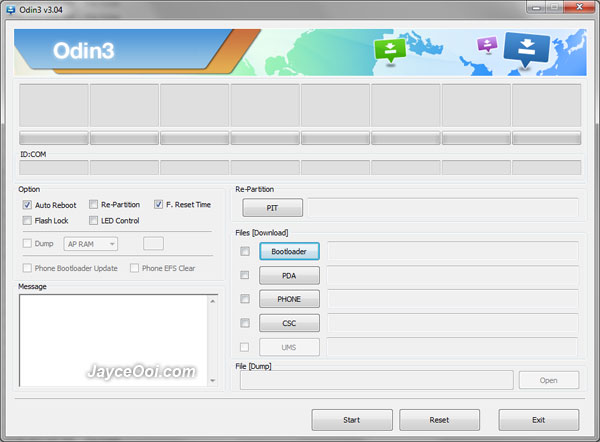
Odin3 v3.04
Note – You need to install Samsung Kies first in order to use Odin3 because Samsung Galaxy S3 needs its USB drivers. Else Odin3 can’t detect Samsung Galaxy S3 in Odin Download Mode. But do ensure Samsung Kies is not opened or loaded in system tray when using Odin3.
Download Odin3 v3.04 here.

Tq jayce..official s3 user
Hello,
I really like your website,sea of information,iam from india,i would like to know from where i will get all the versions of odin and also latest firmware of samsung android?pls give me the links….thanks bro….tc
I only have Odin3 v3.04 and v1.85 here. As for Samsung Android firmware, you can get from Check Fus Downloader.
http://www.jayceooi.com/2012/03/19/check-fus-downloader-download-decrypt-latest-samsung-firmware/
Ok greattt thanks a ton,how to flash microsoft windows and blackberry phones,it would be grate if you write an article on the same
Thanks bro…tc
Can you use both versions Odin3 v3.04 and Odin v1.85 to flash the Samsung Galaxy SII or is v3.04 explicitely for the Galaxy SIII???
I thought Odin could flash all samsung devices…?
Yes. SGS2 can use Odin3 v3.04 too.
Thanks for your reply Jayce.
Found a newer version on the net: Odin3 v3.06,
but i do not publish the link here, as i don’t know if that is allowed.
tx…..jay nice sharing.is odin3 working 4 nexian android???
No panjul.
Hi Jay, i have a question here. recently i have install a kernel called ninphetamin3 used for overclocking the cpu. My s3 was not rooted when this kernel was installed to my phone.
Can i check will i face any problem if i now proceed to root my s3 ? by the way, can we overclock our s3 without rooting our phone?
No idea will you face issue or not when rooting. Yes, overclocking software needs root access.
hi,jay i m using sgs2,, 3.2.2 ..i hv downloaded odin & ICS 4.0.4 XXLQ5 Package & kies also on my computer….do i need to install anything else for upgrading to 4.0.4 ics?? and do i hv to root or do something else to my phone or simply follow the vedio ?? plz reply as i hv no idea how to do it & hv nver attempted it before
Hi harman, please refer to this guide.
http://www.jayceooi.com/2011/08/08/how-to-install-firmware-on-samsung-galaxy-s2-with-odin-video/
plz tell me where to download the firmware from?? i m in india!! and how would i know which is the right one for my phone…plz help
Hi harman, please use Check Fus Downloader to download.
http://www.jayceooi.com/2012/03/19/check-fus-downloader-download-decrypt-latest-samsung-firmware/
plz if you flash a samsung galaxy s2 will the phone sim lock come up again
Sorry maduka, no idea. Try to consult others at XDA Forum.
I got one question, i root my s2 with cf root later can I flash siyah over it?
Yes Don.
hola yo tengo un s i9003 y se bloqueaba a ratos. quise ponerlo de fabrica con las 3 teclas y se me puso en modo downloading como pueso recuperar firmware dicen q con odin pero no se nada de esto
Hi nico, can you write in English? I don’t quite understand you.
Hi, guys.
An ex-good frien of mine have been touching my S-III. He made root an so on (no idea of what it is). I noticed that I was not receiving any sms. Every morning, when I could see “Messages has stopped”.
I asked him to restore my phone to normal and he tried but did not get it. Now he’s left for a 3 months journey and my S-III does not work.
I read that by pressing vol down, star and the other button you coudl recover, but I pressed recover and told me “successfully restored”, but it does not start. I stops at “Samsung Galaxy…”
Coud anyone give a hand?.
Appreciated.
Javier
I have read again this page and it seems that belongs to the Good Samaritan of Jayce.
So, Jayce I’m refering to you. Thanks a lot if you can help me.
I have downloaded Kies and Odin 3, but I do not know how to work with them.
Javier
Alicante
Spain
Hi xavier, please refer to this guide.
http://www.jayceooi.com/2012/06/14/how-to-restore-stock-firmware-on-samsung-galaxy-s3-video/
Hello Jayce!
Thank you for the mail.
I have followed the steps indicated, but to no avail. On step 6 I should get the telephone loading but it remains fixed on the Samsung Galaxy SIII GT-I9300. It does not restart. The number of counts was 4.
I’m afraid I’ve got a real brick on my hands.
Load into recovery mode. Factory reset. Then install stock firmware with Odin.
How I can load into recovery mode?
Hi xavier, please take time to study the guide that I sent you.
By pressing the 3 buttons I get again the Odin mode and: Downloading…, Do not turn off target!!
Volume up, dear.
Jayce, I’m following the instructions on the guide, but everything goes ok until point 6. Instead of starting I get an empty battery.
Charge your battery then.
Jayce, I’m sorry if I’m heavy. I do not know how but I’m in recovery mode. I have pressed wipe data/factory reset. I have confirmed wiping data.
In Odin 3 I have marked phone and autoreboot but gives me: OSM All threads completed (complete 0/ failed 0)
What can I do next?
Thanks very much for your kind answer.
Javier
Hmm… You did not install firmware correctly in this case. Try to install firmware again. Make sure the firmware is correct.
Hi Jayce,
I’m having GT-I9003. I had downloaded ODIN3 v.1.83. But when it try to Boot, it stuck with RED Msg
Android system recovery
Enter: OK Key, Select : Vol UP / Vol Down
reboot system now
apply update from sdcard
wipe data/factory reset
wipe cache partition
E:failed to mount / sdcard (File exists)
E:copy_cache_media:Can’t mount / sdcard
your storage not prepared yet, please use UI menu
for format and reboot actions.
Meida files copy failed.
–Installing package…
Finding update package…
Opening update package…
Verifying update package…
Installing update…
Successfully installed package.
–Wiping data…
Formatting / data…
E:format_volume: rfs format failed on /dev/block/mmcblk0p3
Formatting /dbdata…
Formatting / cache…
Data wipe failed.
–Applying Multi-CSC…
Successfully applied multi-CSC.
I choose reboot system now, it keeps on Bootloop many times. Please advice.
TQ
Hi Tommy, what had you done until you face this issue?
Hi i started Odin and it gave me error that tmax.dll is missing but i see in the zip that it exists.
Try on other PC see.
arent there other options? thank you
Try Odin3 v3.07 see.
http://www.jayceooi.com/2013/01/04/download-odin3-v3-07/
it gives a chinese error
No choice then. Use other PC see.
am downloding samsung ace 5830i firmware but csc and boot loader pda nnot select item what sthe prblm hw to download pda and csc boot loader plzzzz tell me sir
Sorry ashique, I have no idea on this model.









