










Download XBOX 360 controller emulator for PC games? Why do you need an emulator for XBOX 360 Controller for PC games? If you play Grand Theft Auto IV (GTA4) and you do not have any XBOX 360 controller or PS3 controller. Then you will know why I need a XBOX 360 controller emulator. I believe that it is part of the marketing that Microsoft does not support normal PC games controller to work on certain PC games. And these PC games only support XBOX 360 controller. Therefore, you will need to buy a XBOX 360 controller in order to play the games with controller. Else you have to stick with keyboard and mouse. Thanks to Racer_S who made this XBOX 360 controller emulator for PC games. Without Racer_S, I still stuck with keyboard and mouse on Grand Theft Auto IV (GTA4).
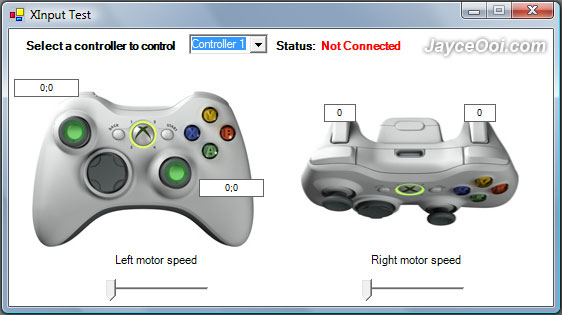
XBOX 360 controller emulator for PC games version 3 is confirmed working with Logitech Cordless Rumblepad 2 & Logitech G25 Racing Wheel. And it works on my USB PS2 mod joypad too. Besides Grand Theft Auto IV (GTA4), it also supports games like Juiced 2: HIN, Crysis WARHEAD, GRID, MotoGP 08, The Club, Kane & Lynch, Sega Rally, Bionic Commando, SpiderMan Web of Shadows, Unreal Tournament 3, Shadowrun, Fallout 3, Flatout 2 Ultimate Carnage, Lord of the Rings Conquest and Mirror’s Edge (with some mapping bugs). However, it is not working on Gears of War and 007 Quantum of Solace. Hehe… It is not a problem for me as I do not play these 2 games.
Interested with XBOX controller emulator for PC games? Head to http://tocaedit.com to download XBOX 360 controller emulator for PC games now.
Atlernative download link – here
P/S – If really cannot work, just buy a new gamepad like GameSir G4s that supports both Android and Windows. It can be connected through Bluetooth 4.0, 2.4GHz wireless and wired. Read GameSir G4s Review to know more.









tnx for the comment. thats more better if u backup ur files before ur hardisk get worst. always backup ur files usind cd or dvd or extra harddisk.
Wha? I can’t believe we need an emulator for a joypad. What a joke.
Its needed because some games (like just cause 2) only support a x360 controller or mouse or keyboard and not other controllers. so I’d say the joke is on you…
No, I agree w/ velik. It’s a joke that the only controller you can use is teh Xbox pad. Even worse is that I have a couple of them, but they are the wireless flavour so they won’t work either.
You can buy a USB receiver for the Xbox 360 controller that you simply plug into your computer. It’s what I use. Works very well actually. Will cost you $20-$30 though.
best reply lol
@Bernie: No choice. Microsoft is still the boss in Windows games. 😛
Thanks for sharing this info, I will download it 🙂
as esu visai žalias ant kompo, paaiškinkit kaip paleisti kompo žaidimą ant xbox?
@arvydas: Huh? Don’t understand at all even after using Google Translator. 😕
‘Tis what I have been searching for ages!
Thereby I confirm that it works with:
-Tom Clancy’s Rainbow Six Vegas/Vegas2
-Prince of Persia (2008) (now with menu nav and rumble)
-Gears of War! (the older version of this patch works as a charm with GOW, however – you should copy the respective .dll inta system32 folder instd of game folder, there’s no rumble support)
-Tom Clancy’s Splinter Cell Double Agent
And all other mentioned games on the post.
Why I use this patch? Because I find XBOX360 controller rather uncomfortable, I like my own Genius super ergonomic+fancooled+rubbersoft+6axis+trackballed+light rumble-joypad.
please help me with splinter cell double agent
how did u get it 2 work
i hav a logitech cordless rumble pad 2 windows 7
could you plz tell me what you did to let Tom Clancy’s Rainbow Six Vegas2 work?
The game just doesnt want to accept my controller…
anybody help with splinter cell double agent please
how did u get it 2 work please please please
i beggin
cryin blood
Well, what’s the “respective.dll”? I cant find anything in the 360-controller-emulator zip file, but i really want to play Gears of War.
Tried the link but get “phpBB : Critical Error
Could not connect to the database ”
What’s that about?
@TimHenman: Please download it at http://forum.jayceooi.com/viewtopic.php?f=6&t=103
The author website is down currently.
Hi I cannot find the controller settings for spiderman 2 and the emulator does not want to work either ?
What can I do ?
hey i try to open it from my desktop but nothing happens. how do i set this all up?
Thanks! I was getting really pissed off with GTA4 not allowing me to use my (ps2 mod)controller.Shall try this out today
when i lunch the emulator an error apear: unhandled exception occurred in you aplication…
I have a vista ultimate os.
Anybody have this error to?
@tavi: This emulator might not support the games that you play.
I am using also vista but home premium. I got the same error “unhandled exception”. I was playing Fallout3. And it said in the readme.txt file that Fallout 3 is supported. DOes this mean that its an OS problem? Anything that can be done to work things around? THanks in advance 🙂
Same problem with Vista Home when I launch XInput Test : Unhandled Exception
System.AccessViolationException: Tentative de lecture ou d’écriture de mémoire protégée. Cela indique souvent qu’une autre mémoire est endommagée.
à MDXInfo.DirectX.XInput.XInput.GetState(Int32 dwUserIndex, State& pState)
à MDXInfo.DirectX.XInput.Controller.PollState()
à MDXInfo.DirectX.XInput.Controller.IsButtonPressed(ControllerButtons buttonsToCheck)
à XInputDemo.MainForm.pictureBox2_Paint(Object sender, PaintEventArgs e)
à System.Windows.Forms.Control.OnPaint(PaintEventArgs e)
à System.Windows.Forms.PictureBox.OnPaint(PaintEventArgs pe)
à System.Windows.Forms.Control.PaintWithErrorHandling(PaintEventArgs e, Int16 layer, Boolean disposeEventArgs)
à System.Windows.Forms.Control.WmPaint(Message& m)
à System.Windows.Forms.Control.WndProc(Message& m)
à System.Windows.Forms.Control.ControlNativeWindow.OnMessage(Message& m)
à System.Windows.Forms.Control.ControlNativeWindow.WndProc(Message& m)
à System.Windows.Forms.NativeWindow.Callback(IntPtr hWnd, Int32 msg, IntPtr wparam, IntPtr lparam)
************** Assemblys chargés **************
mscorlib
Version de l’assembly : 2.0.0.0
Version Win32 : 2.0.50727.3053 (netfxsp.050727-3000)
CodeBase : file:///C:/Windows/Microsoft.NET/Framework/v2.0.50727/mscorlib.dll
—————————————-
XInputTest
Version de l’assembly : 1.0.3300.21118
Version Win32 : 1.0.3300.21118
CodeBase : file:///C:/_Jeux/GTA4/Grand%20Theft%20Auto%20IV/XInputTest.exe
—————————————-
System.Windows.Forms
Version de l’assembly : 2.0.0.0
Version Win32 : 2.0.50727.3053 (netfxsp.050727-3000)
CodeBase : file:///C:/Windows/assembly/GAC_MSIL/System.Windows.Forms/2.0.0.0__b77a5c561934e089/System.Windows.Forms.dll
—————————————-
System
Version de l’assembly : 2.0.0.0
Version Win32 : 2.0.50727.3053 (netfxsp.050727-3000)
CodeBase : file:///C:/Windows/assembly/GAC_MSIL/System/2.0.0.0__b77a5c561934e089/System.dll
—————————————-
System.Drawing
Version de l’assembly : 2.0.0.0
Version Win32 : 2.0.50727.3053 (netfxsp.050727-3000)
CodeBase : file:///C:/Windows/assembly/GAC_MSIL/System.Drawing/2.0.0.0__b03f5f7f11d50a3a/System.Drawing.dll
—————————————-
mscorlib.resources
Version de l’assembly : 2.0.0.0
Version Win32 : 2.0.50727.3053 (netfxsp.050727-3000)
CodeBase : file:///C:/Windows/Microsoft.NET/Framework/v2.0.50727/mscorlib.dll
—————————————-
System.Windows.Forms.resources
Version de l’assembly : 2.0.0.0
Version Win32 : 2.0.50727.3053 (netfxsp.050727-3000)
CodeBase : file:///C:/Windows/assembly/GAC_MSIL/System.Windows.Forms.resources/2.0.0.0_fr_b77a5c561934e089/System.Windows.Forms.resources.dll
—————————————-
************** Débogage JIT **************
Pour activer le débogage juste-à-temps (JIT), le fichier de configuration pour cette
application ou cet ordinateur (machine.config) doit avoir la valeur
jitDebugging définie dans la section system.windows.forms.
L’application doit également être compilée avec le débogage
activé.
Par exemple :
Lorsque le débogage juste-à-temps est activé, les exceptions non gérées
seront envoyées au débogueur JIT inscrit sur l’ordinateur
plutôt que d’être gérées par cette boîte de dialogue.
Hey i have the same problem did you ever get it fixed?
Sumbdy listed errors u get on vista. I hav that problem on win7 whch was running DirectX11 then I took it to wndwsXP then I installed DirectX10(I got frm splintercell double agent, others we not working). I couldn’t use DirectX10 on Win7 coz it can degrade frm DX11 to DX10
Now my prblm with this latest version of xbox emulator is that u can configure the controllers according to how u prefer them, which was possible with the previous emulator.
I found the solution :
In the “xbox360cemu.ini” set :
UseForceFeedback=0 #use 0 to 1; default 0
This now works great, and I’m able to play :
Jums reikia padaryti daugiau prasmės, kai kalbėjo
EXACTLY HOW TO GET THIS 2 WORK WITH -Tom Clancy’s Rainbow Six Vegas/VegAS
Hey guys, you need to go to the xbox360cemu.ini and change the forcefeedback to 0 so that it is disable.. i’m not sure why the rumble is still not working i hope it will have a new patch for it
This is great software man!! Thanks for this program!
I noticed someone mentioned they got it to work with splinter cell, double agent. I was wondering if anyone knew how to do this?
Any help would be appreciated.
Thanks.
please help splinter cell double agent logitech cordless rumble pad 2
THanks!!@
cant seem to get this to work with batman dark asylum…
@Pookie: I just tried it on Batman Arkham Asylum and it is working fine with my controller. 😉
how make to work two controllers. ?
I have the same issue.
Both controllers are plugged in, one controller is detected in xinputtest the other isn’t.
How to make it work with the second controller?
I downloaded it to play with Tom’s RSV, but I have a Madcatz gamepad. When I tested it, the bottons A, B, A, LT, RT, and the second joystick where all out of order. the main joystick and the dpad work perfectly. but my back and my start buttons dont work at all.
anyone know if theres a patch for this?
Try edit xbox360cemu.ini file. Remap the buttons to match your gamepad buttons.
how do u download it
GTA 4 already has full xbox controller support, all GWL have them
Why would you want this?
“Extract dinput8.dll file to the game exe directory if you want to hide your controller from the game.”
I dont get the logic behind doing it. Pls explain.
quote taken from emulator readme
Thanku so much for emulater
now i can play many new games by my old ps2 usb controller.
Thanks bro.
brill upload thanks also works on black ops and harry potter7 cheers 😀
Hi – great program thanks. I can’t seem to get it to work with 2 controllers. In the XInput Test program Controller 1 is connected but no others. Any hints?
Thanks man… Your software is amazing… But I can’t seem to make it work on dead rising 2… any suggestion?? Anyone??? Thank you 🙂
I tried to use the software, but it doesn’t detect my controller. It just says not connected. When I play my other games (PES 2011, etc) my controller responds. Please help
download newest beta and insert right files to right place, read readme
thanks man works great hey guys listen you have 2 choices number 1 figure this out number 2 go buy a 360 controller those are your choices choose 1 and quit complaining lol
I used emulator, but it got controls wrong (buttons, shoulders, triggers, right analog stick) u must remap them by opening x360ce.ini with notepad and remapping buttons with your gamepads numbers,
and for right analog stick u must enter right analog x=6, y=-3 , ussualy u must combo 6 and 3
thanks! this software work perfectly! lets play GTA!V…….
hey is it working for test drive unlimited 2??????
Thanks so much! Works great with Fable 3! I love it!
ขอบคุณTHx
don’t know why but my trust dual pad for pc and ps2 doesn’t work properly… can somebody help me??? the problem is the right analog!! is all switched like instead of going to right it goes down
Hey thanks it what I was searching for ,It works great just have to know what values to place for the controller buttons . The anolog took me a while but I eventually got it ,in the down load add a note everytime you change a value to save to 360emul-note pad then go back and open the virtual controller and see what it does . Was wondering where to place them in the dir s files? on Alien vs Predator 1-2 or does it work for new games only? Peace out !! Try right anolog X=6 ,Y=-3
where do i put it in gta IV. im still stuck using the keyboard please help
hay has anyone written a program to output timed commands through the emulator and redirected them out a usb or Xbox wireless adapter to the Xbox… i would do it myself but i don’t have time and finding one already made is easier :P…. also i don’t know how Microsoft would react to use of a auto controller so i don’t want to be responsible for the code:)
I’ve downloaded the emulator, followed the instructions and I did succeed to make my controlle to behave like an Xbox 360 controller, but dinput8.dll doesn’t work and doesn’t hide my old controller so everything I do ingame doubles and when I select sides (FIFA12) it apears like I have to controlles connected but they move together when I select left or right
Anyone else with this problem ? and is there a solution ?
thanks
I have recently purchases this XBOX360 controller for windows but I am not able feel rumble effect for NFS-most Wanted & COD-Modern Warfare. Can anyone guide me how to configure this? one more question. does these two games support force feedback feature? Plz reply. thanks.
Love this emulator, every time!
Works with Logitech’s Dualpad and FIFA11, GTAIV and now with Saints Row The Third…
Catch dust, mouse and keyboard!
Which County Library? When I looked it up I saw that there are several locations…Hmmmm?
one word: PERFECT… it recognizes automatically the gamepad layout… only some little problem recognizing the x a b y buttons from my 1 2 3 4 buttons… can easly be fixed from the .ini file… g8 work…
“g8 work”? lol
Hey Doesnt work with Most Wanted!
QUE PASSOS TENHO DE FAZER PARA INSTALAR O PROGRAMA E CONSEGUIR OS CONTROLADORES CERTOS PARA JOGAR GTA IV?
Hey, listen, guys. I have a Level Up Blackhawk PS2 Controller with USB Adapter, and GTA IV. I place the files as said on the ReadMe file, but when I try to open XInputTest it says ”Unhandled exception” Anyone else with same error? And when I open GTA IV, I get an error too. Is it bacause I have Windows 7?
This wasnt what I was looking for… I want to use my XBOX 360 controller as a mouse.
^Maybe this is what you are looking for! http://nirklars.wordpress.com/xboxmouse/
@Jayce
Thank you great job 😀
Figured out to use my awesome Logitech Rumblepad
tryin out darksiders. having the same viewing angle problem some r experiencing. ive tried the emulator, no go. the pad that controls the viewing angle, jus controls left n right viewing angles. u cant go up n down. and even thats messed up cuz if u move the pad to the left, the view starts to move to the right and vice versa. im bummed out
i did get the beep wen the game started up. dont think my pc has a speaker. so the sound was more like a thump through my stereo. still no sucess
is this software legal and virusfree
Emulator is legal. No virus found so far.
I placed the required files with my Gta 4 files, but when I open the game, i see the blue logo, the orange-yellowish logo then the game name, then it disappears. One of the Xinput files is causing it to go away, and worst of all its the x_input_9 the one thats needed.
Also do I just have to place the files there? then it automatically works? How do I configure the keys in the emulator for a p2s usb controller?
hi i am using quantam QHM 7468-2V and i wanna play prototype 2 with this when i launched the game i couldn’t recognize any beep and it does not working even it do not shows in option too i had checked it it,s working properly on Xinput test
i place the dll in system 32 folder but if i paste these dll in game diractory game is not starting
where i am lacking please help me .
Hey Jayce, I really need help. i want to make some configuration in xbox360cemu.ini but i dont understand. How to do, that “Right Trigger” would be “Right Analog Y+”? Thank you!
Hi Evaldas, each controller model is unique. Try several times to find out.
hi i have a problem with the re-configuring the buttons. after i made the changes in the cem.ini and i try them with the test.exe everything works fine and as i set it.
then i copy the new cem.ini to the game folder but my changes have no effect. i’m using a ps2 controller with a usb adapter. game i want to play is dark souls.
any suggestions? thanks. by the way: great program.
hello, i know it’s a long shot that you are still following this,but i’m having the same problem you were,if you had figured it out plz,tell me.
Its a Miracle for me 🙂
now i can play
.Prototype
.Darksiders (1 & 2)
.Harry potter (5 6 7 & 8)
.X-men origin
.Madel of honor
and many more new game with my old ps2 type usb gamepad.
Awesome man
i give it a rating 10/10. 🙂
Hi , this work on Win 7 32bit but u need disable forcefeedback = no vibration .
I hope some update will be made to fix this issue.
Tested with Driver San Francisco and Dark Souls Prepare to die edt.
also for dark souls u had to edit right pad to invert X and Y os !
OK sry for double post but here is a working version on Win7 with updated ForceFeedback support, so you got Vibration as well !
http://tocaedit.com/dl/x360ce_vibmod_3104_beta3.zip
This is same stuff from same developer just updated so it support all features on Win 7
Tried, doesn’t exist.
Ma joystiC works properly in PS3 bt right analoguE doesnt work in ma PC while playing FIFA12…. plz guyS hlp me if u can……!!
????????????????????????
Great and many thanks!
A lot of writers create websites like these. What they all forget is to write down How To and/or an email link for support.
Now I ask you to update the page with ‘How to install’ information.
Any way, thanks for your efforts.
Try this link, still you need to update the site.
Or everybody has to scroll down for a long time to see it.
http://fragtheplanet.com/808/emulate-an-xbox-360-controller/
In case the link doesn’t work:
Some games were built to be played with a gamepad not a keyboard and mouse, ie: Prototype GFW. I found a nice little solution to make games think my nice little 7 dollar Dilong gamepad is an official Xbox360 gamepad. Here is a great way to use software to emulate an Xbox360 Controller for your pc. Why would you want to do that? you ask, well some games like Prototype and Assassins Creed are ports of xbox 360 games, so they already have built in support for the PC version Xbox 360 Controller. So basically with this hack you won’t have to do a whole lot of messing about to get your configs right.
Follow the Steps below to get your gamepad to emulate a xbox controller.
Download the Xbox360 Controller Emulator.
Extract the x360ce.ini, xinput1_3.dll, and XInputTest.exe files to the directory of the game you want to use the controller in. The same folder as the game executible.
Plug in the gamepad you will be using.
Run XInputTest.exe and check to make sure your buttons are mapped correctly. If they’re not, open the xbox360cemu.ini file and change around the mappings till it works. Here is the ini file (x360ce), that works with my Dilong USB Dual Shocks Gamepad.
Enjoy gaming again. If your game still doesn’t work with your controller try putting the dinput8.dll file in the game directory also. I had a problem with Need For Speed Hot Pursuit 2010 giving me a error code (That controller has not been setup please go to controls menu in Gameplay to configure it). As soon as I put the dinput8.dll file in there it worked fine.
I really love this little hack, the reason being, there is no program running in the background sucking up resources. It’s just a couple of files and a dll and blammo, instant controller emulation. How great is that!
For more info on compatibility with specific games, check out Rumblepad2 Blog.
I hope this little tutorial helped you out, if it did a comment would much be appreciated.
Up to Date Software – http://code.google.com/p/x360ce/
Another link for the one how needs it:
http://forums.pcsx2.net/Thread-XBox-360-controller-EMULATOR-for-windows
In case the link doesn’t work:
I wanted to post it since i contribiuted to this program with a small fix for gamepads with triggers on single axis.
Download: Virus’s page with newest user modified versions, contain source codes
What is it?
If you have shitty gamepad or any other gamepad that doesnt support XInput ( which 99% of new “games for windows” use ), and you have problems with compatibility, vibration doesnt work in games, games dont detect triggers or axes properly this thing is a solution for you. It translates Direct Input signals from your gamepad to XInput, thanks to that you will never have to configure gamepad controls ( just plug and play, like with xbox 360 gamepad for PC ) and everything will work properly
How do i config
open x360ce.ini and bind your buttons to coresponding x360 controller buttons.
if you have single axis trigger do something like this
Left Trigger=h-1
Right Trigger=h1
h and slider id
use XInputTest.exe to test your config.
everything else is in a comment field in ini file.
To make it run with a game just copy all the files into game directory and just run the game, if you hear “beep” from your PC speaker or if you use vista/7 beep from normal speakers then it means it works. If you did everything right your game will think you actualy use Xbox 360 controller. And your gamepad will work just as the x360 controller.
original author is Racer_S from toca edit forums, but he kinda stopped developing it because he owned only 1 gamepad so he couldnt fix bugs that occured with different gamepads, and it was taken by users and they fixed most remaining bugs.
Check my profile for hardware/software and games i played on PCSX2.
this xbox 360 controller emulator help my controller vibration because when i play games without this software my controller vibration work correctly but when i am using xbox 360 controller emulator my controller vibration not work at all
well i use ps2 controller with it
and i get a problem with right analog of ps2 gamepad
the problem is when i move right analog stick right it shows up on program when on left it shows down on program
if anyone knows how to fix this plz
tell me
Open xbox360cemu.ini and change:
Right Analog X=6
Right Analog Y=-3
Save
i have 2 controllers with same IDs — when I copy the IDs of second controller in PAD 2 — emulator recognizes only first of them….. !! HELP ME !! How to make both of them work ???
Hey all,
I would like to change the speed at which the right stick moves…that is, when I look now, it is a bit fast…can I change this in xbox360cemu.ini, and which line is it? I’m not seeing any “speed” config.
Thanx
hey i downloaded it and it work but i tried it this morning and the config for the buttons has now changed and i dont know how to set it back to normal. i deleted it and reinstalled it but its doing the same thing. any help plz!!!
Hi, I know this is old but I need to ask. I just downloaded and try it in Shovel Knight. Works really amazing BUT there is an issue where for some reason when I press to go forward it stucks for a few seconds (and is not my controller, key is not getting stuck). Any ideas?
THANKS YOU I LOVE YOU <3 <3 ADAMSINIZ AMKKKKK <3 THANK YOU VERY MUCH !
its not working on 2k15, help?
its not working on 2k15, help?
Sorry, I don’t have 2k15 to test.
btw i use a generic controller, please help me to fix this? thanks
What isn’t??
Please Help me to repair joystick control
hi i need help xinput test unhandled exception has occurred in your application plz help.
i have Logitech Cordless Rumblepad 2
I got 2 controllers but it says controller 1 is the only one connected. Help pls.
I downloaded it and it really works…thanks a lot
You are most welcome, mier.
download link pls?
http://file.jayceooi.com/2009/01/xinputemu3.zip