










How to install Android applications and games with .apk file format on Samsung Galaxy Note II? Besides getting Android applications and games from Google Play Store, you can get 3rd party Android applications from Internet (example, XDA Forum). All of them are in apk file format. Same apply to applications and games that backup with ES File Explorer. You will get “Install blocked ~ For security, your phone is set to block installation of applications not obtained from Google Play” when try to install them. No worry, there is a way to install Android applications and games in apk format on Samsung Galaxy Note 2.
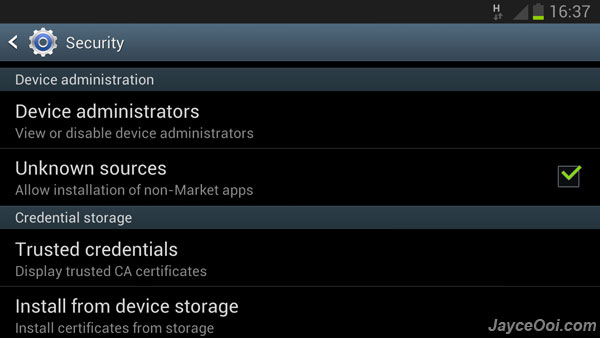
How to install Android applications and games apk on Samsung Galaxy Note 2?
- Go to Settings.
- Select Security.
- Check Unknown sources ~ Allow installation of non-Market apps.
- Then select OK.
- That’s all.
You can use built-in file explorer (My Files) to install Android applications and games in apk format on Samsung Galaxy Note 2 after enabled that.
Note – install untrusted apk files might make your device and personal data vulnerable to attack by those installed applications.











