Arr… My HTC Album shows too many pictures already. It shows pictures from my album in DCIM folder which is correct. But it also show other folders with pictures which I don’t want. How to hide these folders with pictures from HTC Album? It is not hard to hide them. All you need is Windows Mobile Registry Editor. And key in some values.
Things to do…
- Open the registry editor
- Go to HKLM\Software\HTC\HTCAlbum\Ignored (create the Ignored key if doesn’t exist)
- Create a new String Value and name it whatever you want (Example, Garmin)
- Set the Data for the new value to the full path of the folder to be ignored (Example, \Storage Card\Garmin)
- Finally, restart your phone to take effect
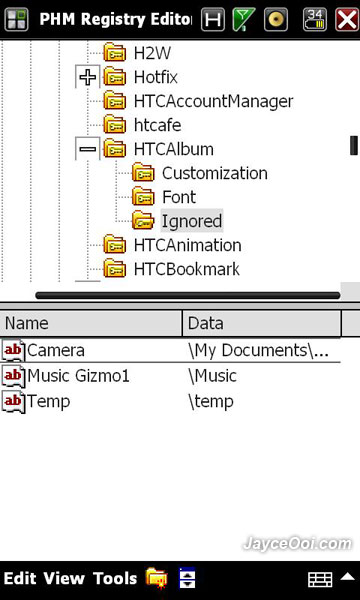
By the way, the folder and its sub folders will not show up in HTC Album after you set it. This trick works on my HTC HD2. It should work on other HTC devices like Touch Diamond 2, Touch Pro 2…