







Want to get a perfect working Samsung Galaxy S II? Be sure to test all Samsung Galaxy S2 hardware functions before you pay for it. Otherwise, you might end like me and got a SUPER AMOLED Plus display issue SGS2. Luckily, all the functions are working fine on my 2nd SGS2.
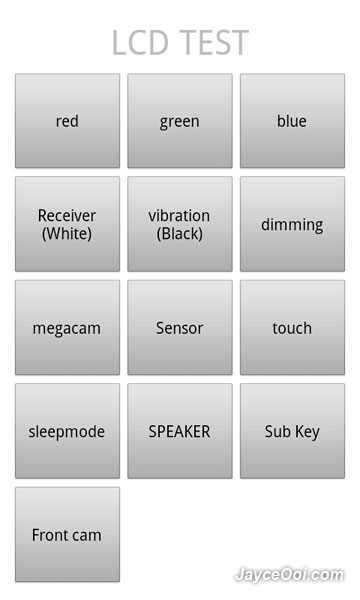
Samsung Galaxy S II hardware test
Note – Don’t try this on US T-Mobile Galaxy S II. Users reported got issue after test it.
How to test Samsung Galaxy S2 hardware functions? Just bring up dialpad. Then key in *#0*#. LCD TEST application will be loaded. You can test SUPER AMOLED Plus display in red, green, blue, white and black colour. Make sure that your AMOLED screen has a perfect colour. You can also test the front and back camera. And test sensors like accelerometer, proximity, lights, gyroscope and magnetic sensors. Test your touch screen sensitiveness…
Okay, does your SGS2 pass all the hardware test?

Tags: Samsung Galaxy S II
[...] Test Samsung Galaxy S2 hardware functions ~ Test the front & back camera, sensors like accelerometer, proximity, lights, gyroscope and [...]
Hi! thanks for posting this, very usefull! Do you know what should be seen under “Proximity”?
I have “Null” and my proximity sensor does not work anymore! Worked just for a few days and now I can’t get it working at all…. Any ideas? thnx
Null is normal. Just use your finger to block the proximity sensor (next to front camera). The screen will turn into green colour.
Hi. Thanks for your reply. It does not work, that’s the thing! When I’m in a call (phone against my chick), the proximity sensor does not turn the screen off as it used to do.
In the hardware test page, if I block the sensor with my finger, it doesn’t turn the screen green, it does nothing.
Sorry to hear that. Try to factory reset. Then test it again. If still cannot, you might want to send back to Samsung for service.
I wanted to test my galaxyS2′s magnetic sensor, thanks Jayce. From where did you find it though ?
Sensor.
the magnetic sensor ? yes I know, I am asking you where was the #*0#* found ? thanks in advance
and what does the sub-key test do ?
Test phone buttons like volume, menu, back…
works well thankfully
Oh, found it from Internet ~ XDA, Lowyat, SamFirmware…
Hi Jayce, thanks for the post. Need some help from you.. MY SGS2′s display stopped working after 3 weeks. I took it to service center, they replaced the screen. But this replaced screen had some visible engraved scratches. I refused to take it they said they’ll replace it again.
My Question:
Q1> How can one verify that authorised service center is replacing with a brand spare part?
Q2> Is there any way to run diagnostic on phone to obtain the spare part number / ids, date of manufacture, etc?
Quick responses will be appreciated. Thanks in Advance.
1. Not sure how Samsung Support work in your country. But in Malaysia, Samsung Service Center is the one that handle all the services and hardware replacements. They should use the original parts.
2. I don’t think that we can check it from user stand point unless you open up your SGS2.
Just wanted to let you guys know that this will mess up your lockscreen (unable to use) and you won’t get it back. I have the galaxy s ii from T-mobile USA and I tried this test the first time and the lockscreen went away. I wasn’t sure what happened to the lockscreen, but it was gone, no matter what settings I put in (pin, pass, pattern, immediately, 5 seconds, etc…).
I did a factory reset and tried the test again, and after the test (most likely the sleepmode test), the lockscreen went away.
I have the same loss of lock screen and noticed its absence right after I ran the *#0*# test that danny ran. Is there a way of fixing this issue without a hard reset?
http://support.t-mobile.com/thread/11123?tstart=0
I haven’t tried this, but maybe you can clear the system cache. It’s not a full reset.
I did a hard reset on my SG2 (T-Mobile) and I have both the lockscreen and powerdown screen restored. I tried clearing caches, taking the battery out while the phone was on among other things and the hard reset is the only thing that worked.
Another update…
I think the test for the lcd is fine when you look at the different colors, but beyond that, it will mess up the lockscreen. I tried it without doing the sleep mode test and still the lockscreen went away. So now I believe it’s the the camera tests or the functions tests.
Hey all,
Does anyone have a solution to fix the lock screen issue. I tried resetting my device all three ways available and still the lock screen bug persists.
Any help will be much appreciated.
thanks,
pranay
DO NOT, i repeat DO NOT use this testing application for more than LCD color tests and sensor tests. There have been many reports of the other tests breaking the phones lockscreen and power button function (see here: http://support.t-mobile.com/thread/9818?start=15&tstart=0 for example).
Until a solution is found, i would recommend staying away from this test.
Author, please take this into consideration.
why every time i try to verify the lcd test it says force to close aplication?
Which SGS2 model do you have?
The model is GT-I9100 and the Android version is 2.3.3
Look like your Android OS is not stable. You can try to factory reset it if you want.
hi,Jayce thanks for your anwers can you tell me how to activate the light sensor of my samsung galaxy s2 model GT-I9100 please?
The light sensor is already activated by default. Yours got issue?
I don’t know the things is that it doesn’t blink?
Just cover the light sensor. Your SGS2 screen should turn into green colour.
Hi, Jayce thanks for your help. you will see after the comment below a link on youtube that the person make its light sensor blink when he verify the sensor of his phone using ‘phone tester’ and also without using this software he verify it by dial *#0*# and he click on sensor the light sensor still blink white.I download phone tester and try to make it blink but it doesn’t and I try the dial method but still the same its doesn’t blink like in the video.can you help me please? Is there a solution? or a problem with my phone? or is there a program for that sir?Thanks in advance you did a great job.
http://www.youtube.com/watch?v=Vym3cRHFjuw
Please consult Samsung Support since your light sensor got issue.
Hello Mr. Jayce
I am using a Samsung Dart (SGH-T499) running Android version 2.2.2.
I tried out the LCD TEST by typing *#0*# on the number pad.
Everything worked out fine, but after exiting the Test, I am encountering a serious problem.
My screen does not lock at all
when I press the lock button, it just turns off the screen, but does not lock it.
Also Screen Timeout turns off the display properly, but even that does not lock the screen.
Please help suggest how I can rectify this.
Eagerly waiting for your reply.
Look like another bug from Samsung. Please consult Samsung Support on your issue. Or factory reset your phone.
Thanks a Lot Mr.Jayce, for such a fast reply.
Can I also upgrade to Android version 2.3.x when I do this factory reset?
Any idea where I can find out more about upgrading the OS?
No. You need to upgrade firmware with Samsung Kies.
Unfortunately Samsung Kies does not work with my phone. & My phone is not listed in the supported models in the Samsung Kies website
Oh, my mistake. I thought all Samsung phones are support by Samsung Kies. Please consult Samsung Support on this as well then.