19 Mar
Posted by Jayce Ooi as Software
Checking new official firmware upgrade while using custom firmware on your Samsung phone or tablet is not an easy task. Because Samsung Kies and built-in software update will not notify you when there is a new firmware released. So you have to check on news website or blog for the latest firmware info. Or you can use Check Fus Downloader to find it out by yourself. In addition, you can also download the official firmware and install it with Odin manually. This is available on Android and Bada platform.
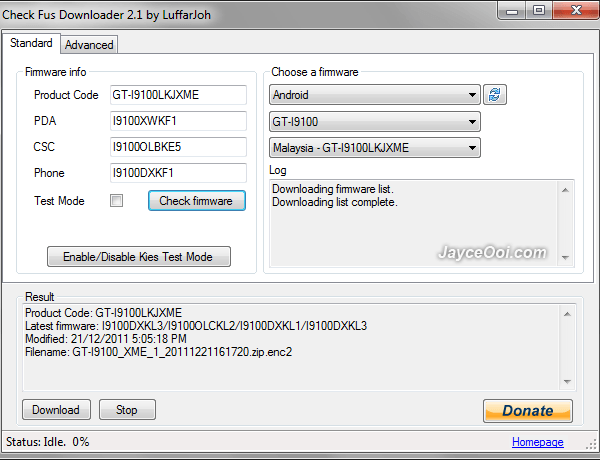
Check Fus Downloader
Besides official firmware, you can also find beta / test mode firmware with Check Fus Downloader. Beta / test mode firmware is a not yet (but soon to be) released firmware and is only intended to be used by advanced users. So you can try out the latest leaked test firmware before official release. By the way, you can also use the web version of Check Fus to find out latest firmware here.
Installation guide ~ How to install firmware on Samsung Galaxy S2 with Odin? (Video)
Download Check Fus Downloader here.

Tags: Check Fus, Check Fus Downloader, firmware, Odin, Samsung, Samsung Kies
hey how to this work .. i install fus downloader
Just select platform, model, country. Then download it.
More then Thanks Bro ^_^
thnxxxx now downloading ..but want 2 conform dat all firmware of every region are offcial or unoffcial= in Check Fus Downloader?
If not mistaken, Check Fus Downloader grabs firmware from Samsung server. So they are official except test mode firmware.
You can also check using this website and/or add @SGS2Update in your twitter account to be updated every 2 hours
https://sites.google.com/site/rizandroid/latest-updates
i lost my samsung galaxy s2 all the contact numbers and application by mistake. can u tell me what i have to do for recover that
You can restore them if you have backup. Else can’t do anything much.
how to install downloaded encrypted file to phone will you please explain the procedure
thanks in avance
Hi adarsh, please refer to installation guide in the post.
To download the software error when it hits CheckFusDownloader_v2.1
CRC check failed.
jack, redownload it again.
Worked.But when I want to update my phone worked side error
do you have any program for updates the firmware for s5260 and s5263
Sorry jack, nope.
How to install firmware on Samsung mobile
Use Samsung Kies or Odin.
If the file is an operating system Firmware Samsung s5260 bada
Not sure Samsung Kies can use or not. Please consult Samsung Support.
Hi Jayce,
Do we need to save this exe file in a certain directory? I’m getting “Error while reading file. Try delete dbdata.db and restart the program.” error. I already tried to delete the dbdata.db and try to move it to other directory but no to avail. Can you post a link of your file maybe the site is broken due to number of people who try to check JB..:D
Also any chance or % of bricking the device with this process? I’m kinda hesitant especially now that I got defected installer. :p
Thanks Jayce.
No other download link. I got it from Check Fus Downloader website.
Yes, there is chance of bricking even with Samsung Kies itself.
hello this program does not work, I installed everything and I can not find any software? do not know what problem is?
It stopped working lately. Maybe server issue…
Hello J,
I kinda installed 4.1.2 in my SGS2. but i really want to go back to ICS. Is there is any way to make this happen??
Yes, Alfred. Factory reset first. Then install ICS firmware with Odin.
http://www.jayceooi.com/2011/08/08/how-to-install-firmware-on-samsung-galaxy-s2-with-odin-video/
every time i try to download firmware from check fus downloader it says no firmware info retrieved for given data. is there any way to stop this
It is not working for the moment and the owner is aware of that. It should work again in the new version.