Hmm… I received lot of question on how to enable Internet and MMS on Android lately. So here is the list that I gathered from Internet. Hopefully, it will solve all of your cannot connect to Internet and send MMS issues. Okay, here are some questions that you might ask…
What is an “APN”?
“APN” == Access Point Name. It allows you to connect to the Internet and send MMS through your phone carrier.
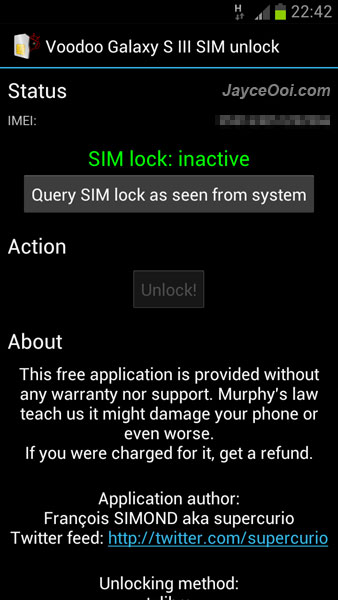
How to unlock Samsung Galaxy S III GT-I9300? Are you using carrier locked Samsung Galaxy S3? Want to unlock Samsung Galaxy S3 from O2, T-mobile, TMN, Orange and Three? Today is your lucky day. You can unlock Samsung Galaxy S3 for free with Voodoo Galaxy S III SIM Unlock application. It unlocks your Samsung Galaxy S3 baseband so it becomes able to use SIM card from any carrier without restriction. Note – root access is required.
ClockworkMod Recovery (CWM) for HTC HD2 is a must installed tool as most of the NAND Android ROMs are in CWM zip format. You need to use ClockworkMod Recovery to install these zip ROMs from SD card. Besides, ClockworkMod Recovery can make full system backup and restore using Nandroid. ClockworkMod Recovery v1.3 will be installed into NAND memory, therefore MAGLDR v1.13 is needed. Please follow step by step video guide to install it.
There are 3 partition layout sizes for ClockworkMod Recovery v1.3 ~ 150MB, 250MB and 400MB. Which partition layout size of ClockworkMod Recovery should I use? Depending on what type of ROM that you plan to use, you should choose the partition size based on the following.
150MB Partition – For bare ROM including CyanogenMod, AOSP, and MIUI
250MB Partition – For Android 4.0 Ice Cream Sandwich, Standard Sense ROM including Desire and EVO based ROM, can also be used for some squashed HD builds
400MB Partition – For Larger ROM including unsquashed Desire HD and Z ROM
DFT LEO MAGLDR Bootloader is the bootloader that supports NAND Android and Windows Phone 7. Both HTC HD2 and T-Mobile HD2 are supported in MAGLDR v1.13. The latest MAGLDR v1.13 supports Android Recovery (AD Recovery) which put ClockworkMod Recovery (CWM) in NAND memory instead of SD card. How to Install MAGLDR on HTC HD2? Just follow my step by step video guide to install.
Note – Your operation system like Windows Mobile 6.5 will be deleted when you install MAGLDR. Everything in your phone will be deleted. Do make a backup if you want to keep them. Do transfer all the data like contacts, calendar, SMS out first before install MAGLDR.
How to restore stock ROM on HTC HD2? How to remove everything that I installed for Android or Windows Phone 7? I need to send HTC HD2 to HTC Support for warranty service because unlocking bootloader may void all or parts of your warranty. No worry, you can restore HTC HD2 to stock ROM and everything back to stock even after installed Android or Windows Phone 7. Just follow below step by step video guide.
Prerequisites
Stock ROM
Note – make sure that you have downloaded a HTC HD2 official Windows Mobile ROM from HTC Website for your country. Don’t use other region ROM other than your very own region. As for T-Mobile HD2, do download yours from T-Mobile website. And use free unzip software – 7-Zip to extract the exe file.
Continuing its legacy of connecting people to fun, adventure and memories, Kingston Technology, a world leader in memory products and technology solutions, has teamed...